 grabcad
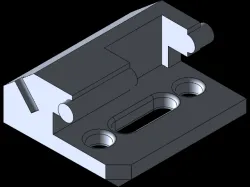
Fixture Block
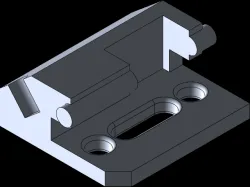
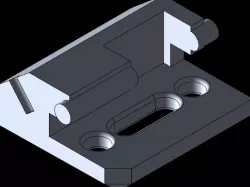
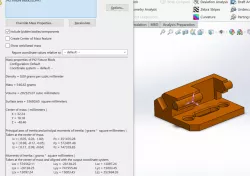
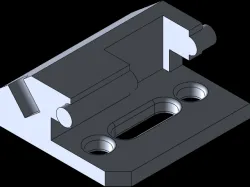
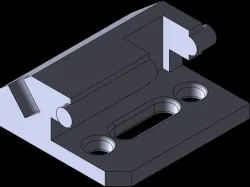
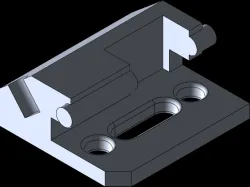
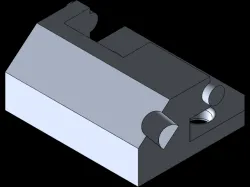
I started off with changing the material to 1060 Alloy. I then elected on front plane and sketch. I selected the line tool and created a vertical line going up from the origin with the dimension of 25mm. I sketched a line to the right with a 50 degree angle and the length of 20mm. I connected a 30mm horizontal to the right. A vertical line going down with the dimension of 20mm connect a line horizontally to the right with the dimension of 15mm. A vertical line down with the dimension of 15mm. Create a line going right and connect it to a vertical line going down 15mm then connect the line of 90mm to the origin. Extrude the sketch flip the direction and change the dimension of 100mm. Select the front sketch and select sketch to create a circle on the midpoint of the top right line with the diameter of 20. Extrude the circle with the dimension of 5mm then select direction 2 and change the dimension to 105mm. Select the top angled sketch and create a circle on the midpoint of the bottom line with the diameter of 15. Extrude cut the circle with the dimension of 20mm. Sketch the top of the 3D modal create a rectangle with the dimension of 45mm. Dimension it from the top of the modal 10mm and 10mm away from the left line. Extrude cut select up to surface and select the top of the bottom of the modal. On the top sketch create two circle with a diameter of 15 top and bottom and create a straight slot with the center line being 30mm and the width 15mm. Select dimension then the midpoint of the bottom circle and the midpoint of the bottom circle of the straight slot and dimension of 20mm. Select the midpoint of the top circle and the midpoint of the top circle from the straight slot. Select the midpoint of the top circle and the top line and dimension it 15mm. Then select the midpoint of the top circle and select the right line and dimension 30mm then click on the middle line of the straight slot and the right line and dimension it 30mm. Extrude cut the circles and the straight slot and select through all. Fillet the circles and the straight slot to 2mm. Chamfer the corner line on the bottom right of the sketch and change the dimension to 10mm.Mass: 546.82 gramsVolume: 202525.07 cubic millimetersSurface Area: 33680.65 square millimeters
Direct link to the original creator's page
Also Available On
More from vanessa
Similar Models
Model Specifications
Frequently Asked Questions
How do I download Fixture Block?
Click the "View on grabcad" button above to visit the original model page on grabcad. You can download the STL file directly from the creator's page for free.
What 3D printer can I use for this model?
This STL file is compatible with most FDM 3D printers (Creality Ender 3, Prusa MK3S+, Bambu Lab, etc.) and resin printers (Elegoo, Anycubic). Check the original page for recommended print settings and materials.
Is this 3D model free to download?
Yes, this model is available as a free download on grabcad. Some creators accept tips or donations.
Can I modify this STL file?
Most STL files can be modified using free software like Blender, TinkerCAD, or Meshmixer. Check the license on the original grabcad page to see if modifications are permitted by the creator.