 thingiverse
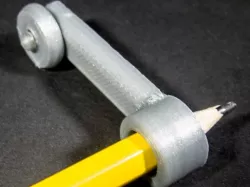
Scriber
I think this is a genuinely useful tool.
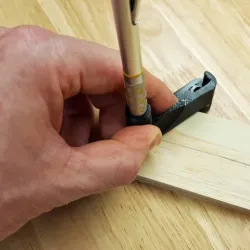
I don't know if you've ever tried to cut a piece of wood to fit an irregular wall, but it's hard to gauge how much to cut out of it to match the wall.
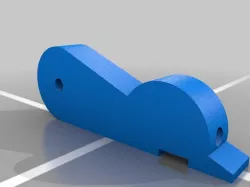
With this tool, you can run the wheel up the wall while the pencil marks a precise line on the wood (or wallpaper, or cupboard, or whatever else you're trying to fix up).
Instructions
Load up both parts (they're in a single STL file). You may need to rotate them 90° so they sit flat on your bed.
Print them out. I used 30% fill, and that worked fine.
Snap the wheel onto the axle. Push it right down before trying to turn it, so it clicks over the enlarged cap that will then hold it in place.
Stick in a pencil. The hole is chamfered, so it should hold several different sizes of pencil.
Scribe away!
Direct link to the original creator's page
Also Available On
More from stevecaplin

Similar Models
Model Specifications
Frequently Asked Questions
How do I download Scriber?
Click the "View on thingiverse" button above to visit the original model page on thingiverse. You can download the STL file directly from the creator's page for free.
What 3D printer can I use for this model?
This STL file is compatible with most FDM 3D printers (Creality Ender 3, Prusa MK3S+, Bambu Lab, etc.) and resin printers (Elegoo, Anycubic). Check the original page for recommended print settings and materials.
Is this 3D model free to download?
Yes, this model is available as a free download on thingiverse. Some creators accept tips or donations.
Can I modify this STL file?
Most STL files can be modified using free software like Blender, TinkerCAD, or Meshmixer. Check the license on the original thingiverse page to see if modifications are permitted by the creator.