 thingiverse
Plane
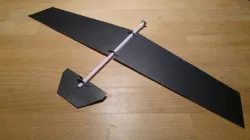
This is really fast project you can do. This plane designed to fly! Almost no cost required. Fave fun!
Materials:
1x straw with 5mm diameter and a length between 7-8 inches or 18-21 cm;
1x Nut with 5mm inner diameter (N10);
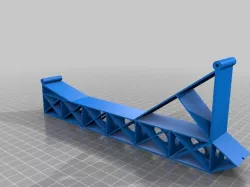
3x or more plane suport frame (STL file);
1x A4 cardboard with ~0.6mm thickness;
First you need to put plane's supports on straw. Then print, cut and put the wings on the frame. You can put duck tape or super glue on wings to make sure they do not came off with crashes. Finally put the nut on plane's nose, this will a balance your plane. Make sure the nut is secure. You will need to find the balance of your plane between the nut and the wings to plane fly.
Comment if you make it and what was your difficulty. Also follow me on Instagram for more projects @screw._it
Direct link to the original creator's page
Also Available On
More from screwit
Similar Models

Model Specifications
Frequently Asked Questions
How do I download Plane?
Click the "View on thingiverse" button above to visit the original model page on thingiverse. You can download the STL file directly from the creator's page for free.
What 3D printer can I use for this model?
This STL file is compatible with most FDM 3D printers (Creality Ender 3, Prusa MK3S+, Bambu Lab, etc.) and resin printers (Elegoo, Anycubic). Check the original page for recommended print settings and materials.
Is this 3D model free to download?
Yes, this model is available as a free download on thingiverse. Some creators accept tips or donations.
Can I modify this STL file?
Most STL files can be modified using free software like Blender, TinkerCAD, or Meshmixer. Check the license on the original thingiverse page to see if modifications are permitted by the creator.