 thingiverse
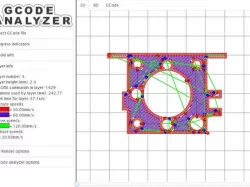
GCode Analyzer/Visualizer
Hey everbody,
Wanted to show you a little project I've been working on for some time - http://gcode.ws
As you might've guessed by the topic name - it's a GCode visualizer. And I guess at that point most of you are asking why the hell anyone would write another one.
Well, mainly because I haven't found a single one that would comply with my humble list of requirements. I mean, most of them allows me to.. well.. visualize GCode file and nothing else. But when I open gcode - it's not for my estetical pleasure, it's to check that there are no problems and to see effects that recent slicer configuration changes done or for any other of several reasons. And the ones I've seen so far doesn't allow me to do that stuff effectively.
So I decided to write one myself.
Feature list:
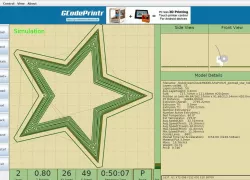
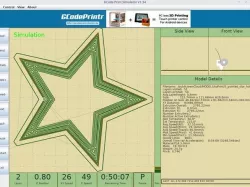
1) Visualize GCode in 2D, layer by layer
1.1) Show retracts and restarts
1.2) Show print/move/retract speeds
1.3) Display only part of layer/animate squence of layer printing
2) Analyze GCode
2.1) Print time, amount of plastic used, layer height, etc. for whole file and for single layer
2.2) Reference visualized part to GCode file (i.e. select a certain part of 2d visalization, switch to GCode view - it will highlight list of lines responsible for visualized piece)
3) Multiplatform, available online (but works offline too), works locally (doesn't upload you gcode anywhere or download anything but application itself)
4) 3D visualization (I don't know what for, it's dull and useless.. need to rewrite it to be like in repetier host)
5) And yeah, it's slow, memory hungry and only supports modern browsers like chrome and ff of latests versions (maybe safari 6 and ie10, haven't checked)
6) Totaly open source so you can use it as you like )
Update 27 Nov 2012:
Lots of bug fixes, support for DC extruders (M101/M103), order of magnitude improvement in loading time for files with lots of Z movements (like Z-lifts)
Update 28 January 2013
Lots of bugfixes. Support for upper layer "shadowing" and setting extrusion visual thickness.
Update: spring 2013
Lots of things have changes. You can now use color differentiation based on flow rate, not speed. You can enable "extrusion width" emulation to see how well your infill should look. There is a highly experimental feature "error analysis" that is available at http://gcode.ws/?new
And it's migrated to another domain long time ago =)
Instructions
Current state it somewhat stable, at least I use it myself all the time. Easiest way to use it - just go to http://gcode.ws
Alternatively - you can download a snapshot of sources from attachment or go to https://github.com/hudbrog/gCodeViewer/
If you wish to use it locally (i.e. with sources on you local machine) - you will need to add "--allow-file-access-from-files" parameter to chrome(which is unsafe and I DO NOT RECOMMEND it), otherwise it won't work.
Direct link to the original creator's page
More from hudbrog
Similar Models


Model Specifications
Frequently Asked Questions
How do I download GCode Analyzer/Visualizer?
Click the "View on thingiverse" button above to visit the original model page on thingiverse. You can download the STL file directly from the creator's page for free.
What 3D printer can I use for this model?
This STL file is compatible with most FDM 3D printers (Creality Ender 3, Prusa MK3S+, Bambu Lab, etc.) and resin printers (Elegoo, Anycubic). Check the original page for recommended print settings and materials.
Is this 3D model free to download?
Yes, this model is available as a free download on thingiverse. Some creators accept tips or donations.
Can I modify this STL file?
Most STL files can be modified using free software like Blender, TinkerCAD, or Meshmixer. Check the license on the original thingiverse page to see if modifications are permitted by the creator.