 thingiverse
Wire Straightener
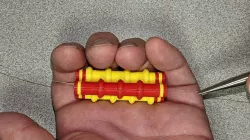
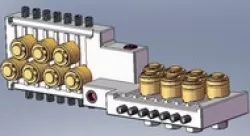
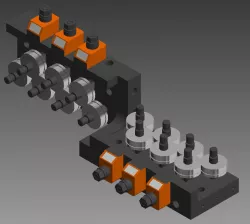
Wire straightening hand tool. Two colors are shown for clarity.
All press-fit parts. No supports are needed, but I did use a 3 mm brim. Also, I placed the three "rollers" close together so their brims touched. The idea is to create an even larger adhesion layer.
There are two roller styles. "Wire Straightener-Roller-3" has three "doughnuts." "Wire Straightener-Roller-4" has four. Notice in the photos that one of the two Roller-4s is flipped compared to the other.
There are two link lengths. Print only one of the lengths. "Wire Straightener-24-30 AWG Link" holds the rollers apart just far enough that the doughnuts don't touch. "Wire Straightener-18-24 AWG Link" holds the rollers a bit farther apart to fit larger gauge wires. These two lengths were determined empirically (by trial and error) using a very small sample of wires. Your printer's characteristics and the insulation variations of your wires will likely affect performance.
Print List
- (1) Roller-3
- (2) Roller-4
- (4) Links (of the same length)
- (4) Washers
- (6) Pins
Assemble as shown in the photos above. Use washers to keep links straight. The order of the rollers is not important, I put the 3-doughnut roller in the middle. What is important is that the two 4-doughnut rollers are assembled in the opposite orientation.
I found that a fingernail file (sandpaper on a stick) works great at removing burrs from the pins. This makes assembly easier.
The straightener is super easy to use. Open the straightener, lay the wire across the rollers lengthwise, close the straightener and pull the wire through. There are plenty of videos demonstrating the procedure. Just search for "wire straightener."
Direct link to the original creator's page
Also Available On
More from mcavoya
Similar Models


Model Specifications
Frequently Asked Questions
How do I download Wire Straightener?
Click the "View on thingiverse" button above to visit the original model page on thingiverse. You can download the STL file directly from the creator's page for free.
What 3D printer can I use for this model?
This STL file is compatible with most FDM 3D printers (Creality Ender 3, Prusa MK3S+, Bambu Lab, etc.) and resin printers (Elegoo, Anycubic). Check the original page for recommended print settings and materials.
Is this 3D model free to download?
Yes, this model is available as a free download on thingiverse. Some creators accept tips or donations.
Can I modify this STL file?
Most STL files can be modified using free software like Blender, TinkerCAD, or Meshmixer. Check the license on the original thingiverse page to see if modifications are permitted by the creator.