 prusaprinters
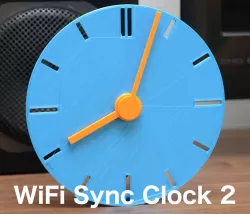
WiFi Sync Clock 2
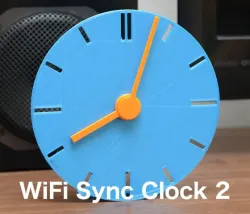
Two hand analog clock with automatic time adjustment using NTP via WiFi.Contrary to the former WiFi Sync Clock, this clock works normally with monotonic CW rotation (except origin alignment once a day).It resets the position of hands once a day at 0:00 (and initialization period after power on). The hands of the clock rotates CCW (counter clockwise) and stopped mechanically at 0:00.Owing to the special hook mechanism, it can precisely align the position of the hands.ESP32 microcontroller connects to the time server (ntp server) via WiFi.VideoYou needESP32 based micro controller with WiFi. I used "MH-ET LIVE MiniKit" type ESP32-WROOM-32 board (around 5USD).28BYJ-48 geared stepper motor and its driver circuit (around 3USD)M2 and M3 tapping screwsHow to makePrint all parts with supplied posture. No support needed.Remove debris and blobs from the parts well. Especially, all axes of hands should be smooth.Please be careful not to use too long screws. How to use WiFi settingYou can configure your WiFi to the micro controller by two ways : Smartconfing or Hard coding.Smartconfig1 Settrue to the flag named WIFI_SMARTCONFIG at line #7 in the source code,#define WIFI_SMARTCONFIG true then compile and flash it to the micro controller.2 Install the apps for setting WiFi. The apps are atAndroid: https://play.google.com/store/apps/details?id=com.khoazero123.iot_esptouch_demo&hl=ja≷=USiOS: https://apps.apple.com/jp/app/espressif-esptouch/id10711767003 Power on the clock and wait for a minute. The status of WiFi connection is indicated by the motion of the second hand.Large reciprocal motion : connecting to WiFi using previous setting stored in non-volatile memory.Small reciprocal motion : SmartConfig mode. If 30 seconds of WiFi connection trial fails, it automatically moves to the the smartConfig mode (waiting for the configuration from smartphone app.)4 Set the password of your WiFi using the app as shown above.Please not that your smartphone should be connected to 2.4GHz WiFi. Configured WiFi settings are stored in non-volatile memory and are kept even when the power is turned off.Hard coding1 Setfalse to the flag named WIFI_SMARTCONFIG at line #7 in the source code,#define WIFI_SMARTCONFIG false 2 Then you can set SSID and password of your WiFi in the source code directly at lines #11-12,#define WIFI_SSID "SSID" // your WiFi's SSID #define WIFI_PASS "PASS" // your WiFi's password 3 Compile and flash it to the micro controller.Category: Gadgets
Direct link to the original creator's page
Also Available On
More from shiura
 prusaprinters
 thingiverse
 thingiverse
 thingiverse
 thingiverse
 thingiverse
Similar Models
 prusaprinters
 prusaprinters
 prusaprinters
 prusaprinters
 prusaprinters
 prusaprinters
 prusaprinters
 prusaprinters
Model Specifications
Frequently Asked Questions
How do I download WiFi Sync Clock 2?
Click the "View on prusaprinters" button above to visit the original model page on prusaprinters. You can download the STL file directly from the creator's page for free.
What 3D printer can I use for this model?
This STL file is compatible with most FDM 3D printers (Creality Ender 3, Prusa MK3S+, Bambu Lab, etc.) and resin printers (Elegoo, Anycubic). Check the original page for recommended print settings and materials.
Is this 3D model free to download?
Yes, this model is available as a free download on prusaprinters. Some creators accept tips or donations.
Can I modify this STL file?
Most STL files can be modified using free software like Blender, TinkerCAD, or Meshmixer. Check the license on the original prusaprinters page to see if modifications are permitted by the creator.