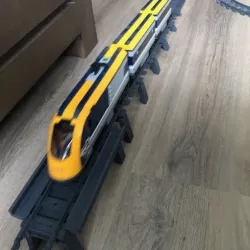
 cults3d
train bridge
train bridge
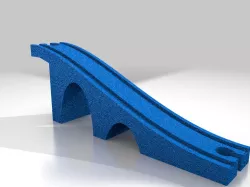
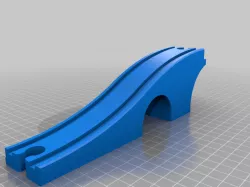
This bridge is a print that needs support.
This track is compatible with the .... train track.
There are 2 types of track files. the short one is for the climbing and descend. The larger one is for the bridge section. The track slides into the bridge section and will hold this up.
The support parts makes the hight of the bridge so you can chose how hight you want to go. notice that you will need to print 2 of each.
For a flexible connection with the existing rail you can print the flex connection. This part is also necessary at the top of the bridge as a connection between the climb and rail on the bridge.
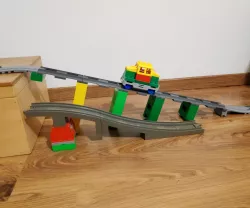
On each of the support pillars you will need to put the "bridge support rails connector train track" The support pillars are placed under the connection of the rails. that way you get a climb of 5 degrees.
If you want to go let say to support 7 than you have to print the part 7 4x.
2 as the latest of the climb an 2 as support of the bridge. On the last 2 parts you need to put the "bridge support rails connector bridge train track by ctrl design.stl"
So you can choose to with hight you go and apply the role the highest number of the support has to be printed 4x
If you decide to make a longer bridge you have to print the larges support number multiple times and also the "bridge support rails connector bridge train track by ctrl design.stl".
The bridge part will be printed the best standing without support.
enjoy printing
Direct link to the original creator's page
Also Available On
More from byctrldesign

Similar Models
 myminifactory
 thingiverse
 grabcad
 thingiverse
 thingiverse
 thingiverse
 cults3d
 thingiverse
Model Specifications
Frequently Asked Questions
How do I download train bridge?
Click the "View on cults3d" button above to visit the original model page on cults3d. You can download the STL file directly from the creator's page.
What 3D printer can I use for this model?
This STL file is compatible with most FDM 3D printers (Creality Ender 3, Prusa MK3S+, Bambu Lab, etc.) and resin printers (Elegoo, Anycubic). Check the original page for recommended print settings and materials.
Is this 3D model free to download?
This is a premium model priced at on cults3d. Premium models often include higher detail, multiple parts, and print-tested files.
Can I modify this STL file?
Most STL files can be modified using free software like Blender, TinkerCAD, or Meshmixer. Check the license on the original cults3d page to see if modifications are permitted by the creator.