 prusaprinters
ToolBox
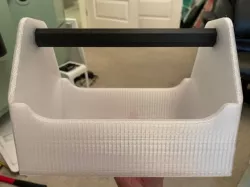
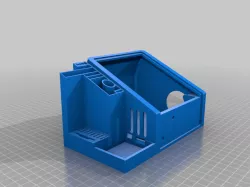
Open toolbox. All parts should be printable as is with no supports.
Directions for printing:
Print with handle horizontal for best strength. The screws require a #8mm allen wrench. They will sit flush with the box and the handle will not spin after tightening. Print screws with allen head opening on build plate. I printed the body of the box with PETG and suggest to use an adhesive on a rigid build plate since this is a large box and can be possible to warp depending on what filament you use. During my first test, the PETG I used stuck great to the magnetic flexible plate, but pulled it up.
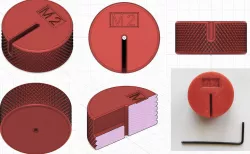
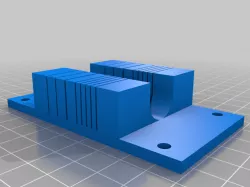
I have included 3 different screw sizes just in case your tolerances differ. On the inside of the screws, they are labeled with test for "L" as in loosest, "M' for medium, and "T" for tightest screw. I would suggest using the loosest or middle screw. I have included small section test pieces for the body of the toolbox, and also a section of the handle so that you can test the fits before committing to a full print for filament saving purposes.
I printed my box successfully with a .6mm nozzle, 20% infill, 3 perimeters/walls, and layer height of .4mm on my CR10. I would recommend not to scale the model, as this has not been tested, and would throw off the hole sizes such as the #8mm allen wrench screw fitting. I included 3 different sized boxes with the corresponding sized handle.
The sizes are:
270L X 180w X 195h (fits CR10)
235L X 157w X 170h (fits Prusa MK3/S)
210L X140w X 160h (fits Ender 3)
Please check the file description for the matching handle size.
Hope you all enjoy this box. If you need a more specific size, let me know
I'd really appreciate if you post your makes! Thanks.
Print instructionsCategory: Tools Summary
Open toolbox. All parts should be printable as is with no supports.
Directions for printing:
Print with handle horizontal for best strength. The screws require a #8mm allen wrench. They will sit flush with the box and the handle will not spin after tightening. Print screws with allen head opening on build plate. I printed the body of the box with PETG and suggest to use an adhesive on a rigid build plate since this is a large box and can be possible to warp depending on what filament you use. During my first test, the PETG I used stuck great to the magnetic flexible plate, but pulled it up.
I have included 3 different screw sizes just in case your tolerances differ. I would suggest using the loosest or middle screw. I have included small section test pieces for the body of the toolbox, and also a section of the handle so that you can test the fits before committing to a full print for filament saving purposes.
I printed my box successfully with a .6mm nozzle, 20% infill, 3 perimeters/walls, and layer height of .4mm on my CR10. I would recommend not to scale the model, as this has not been tested, and would throw off the hole sizes such as the #8mm allen wrench screw fitting. I included 3 different sized boxes with the corresponding sized handle.
The sizes are:
270L X 180w X 195h (fits CR10)
235L X 157w X 170h (fits Prusa MK3/S)
210L X140w X 160h (fits Ender 3)
Please check the file description for the matching handle size.
Hope you all enjoy this box. If you need a more specific size, let me know.
Print Settings
Printer Brand:
Creality
Printer: CR-10</div>Rafts:
No
Supports: No</div>Resolution:
0.2
Infill: 20%</div>
Filament:
[
Duramic, Priline PETG, Carbon Fiber PC ](http://www.amazon.com/s?url=search-alias&field-keywords=Duramic%2C+Priline+PETG%2C+Carbon+Fiber+PC&tag=tvad03-20) Clear, Carbon Fiber Notes: Any material does the trick. How I Designed This
Fusion 360
Direct link to the original creator's page
Also Available On
More from georg
Similar Models
 prusaprinters
 prusaprinters
 prusaprinters
 prusaprinters
 prusaprinters
 prusaprinters
 prusaprinters
 prusaprinters
Model Specifications
Frequently Asked Questions
How do I download ToolBox?
Click the "View on prusaprinters" button above to visit the original model page on prusaprinters. You can download the STL file directly from the creator's page for free.
What 3D printer can I use for this model?
This STL file is compatible with most FDM 3D printers (Creality Ender 3, Prusa MK3S+, Bambu Lab, etc.) and resin printers (Elegoo, Anycubic). Check the original page for recommended print settings and materials.
Is this 3D model free to download?
Yes, this model is available as a free download on prusaprinters. Some creators accept tips or donations.
Can I modify this STL file?
Most STL files can be modified using free software like Blender, TinkerCAD, or Meshmixer. Check the license on the original prusaprinters page to see if modifications are permitted by the creator.