 prusaprinters
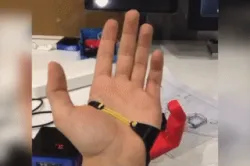
Third Thumb
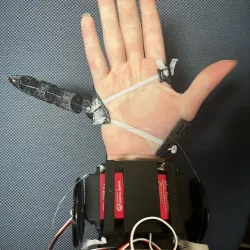
This is a recreation of Dani Clode's Third Thumb project. I've been working on this for approximately 2 years.Here's a BOM:PLA (or any other rigid filament)TPU (or any other flexible filament)PTFE tube (ID=1mm, OD=2mm)Fishing lineArduino NanoNano servo expansion boardSG90 ServoJumper wiresRubber bandsPressure film resistor (I used tis one)10 kOm resistorUnnecessary: 6x AAA batteriesUnnecessary: 12x M3x10 screwsUnnecessary: 12x M3 NutsPrintable parts:TTTP_FingerTTTP_MountTTTP_MountSupport1TTTP_MountSupport2TTTP_BoardBoxTTTP_BionicMuscleUnnecessary: TTTP_BionicMuscle_BeltLoop_1Unnecessary: TTTP_BionicMuscle_BeltLoop_2Unnecessary: TTTP_BoardBoxLidUnnecessary: TTTP_BeltBatteryPack (remixed from this)Parts marked “Unnecessary” make the project portable. Being space efficient was never the point, the project is made for one 5 minute presentation, however i am going to be releasing it for download soon. It would be nice to make it actually usable, practical and modular. So if you have any suggestions or pictures of technical details DM me. Thanks in advance! Here's my reddit post where you can ask any questions about the project. Sadly, there are no instructions for assembly, because I've been working on this for ~2 years and I'm sick of it :) There is the code:#include Servo myservo; // create a servo object to control the servo motorint potpin = A0; // analog pin a0 for the resistive sensorint val; // variable to read the sensor value void setup() {myservo.attach(9); // connect the servo motor to pin 9 of the servo objectSerial.begin(115200); // connect to the serial monitor with baud rate of 115200} void loop() {val = analogRead(potpin); // read the sensor value (value between 0 and 1023)Serial.println(val); // send the sensor data to the monitor (for debugging purposes only)val = map(val, 500, 20, 0, 180); // convert the amplitude of the value to degrees (value between 0 and 180)myservo.write(val); // send the command with the variable to the motordelay(15); // wait for 15 milliseconds}
Direct link to the original creator's page
Also Available On
More from kirilleras


Similar Models
 prusaprinters
 pinshape
 cults3d
 thingiverse
 thingiverse
 thingiverse
 thingiverse
 thingiverse
Model Specifications
Frequently Asked Questions
How do I download Third Thumb?
Click the "View on prusaprinters" button above to visit the original model page on prusaprinters. You can download the STL file directly from the creator's page for free.
What 3D printer can I use for this model?
This STL file is compatible with most FDM 3D printers (Creality Ender 3, Prusa MK3S+, Bambu Lab, etc.) and resin printers (Elegoo, Anycubic). Check the original page for recommended print settings and materials.
Is this 3D model free to download?
Yes, this model is available as a free download on prusaprinters. Some creators accept tips or donations.
Can I modify this STL file?
Most STL files can be modified using free software like Blender, TinkerCAD, or Meshmixer. Check the license on the original prusaprinters page to see if modifications are permitted by the creator.