 CrealityCloud
Fișiere pentru imprimante 3D | Fișier 3MF | Mouse Ears Ring 3D Printing Model – Adorable Jewelry Design
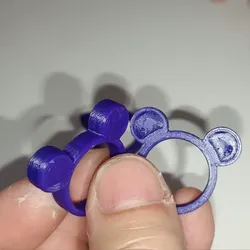
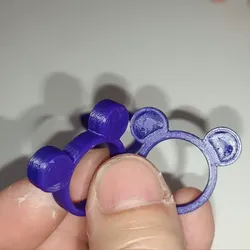
🐭 Mouse Ears Ring 3D Printing Model – Adorable Jewelry DesignAdd a touch of cuteness to your jewelry collection with this adorable Mouse Ears Ring 3D Printing Model! Perfect for fans of charming, whimsical designs, this digital STL file lets you create your own custom ring using any compatible 3D printer.This playful ring features iconic mouse ears, making it a fun and stylish accessory for kids, teens, or the young at heart. Ideal for everyday wear, themed events, cosplay, or as a thoughtful DIY gift!🖨️ Product Details:Format: STL file (digital download)Ring Size: Adjustable or resizable in slicer softwarePrinter Compatibility: Works with FDM and resin printersSupports Needed: No Support neededSkill Level: Beginner to Intermediate🎯 Perfect For:Jewelry makers & hobbyistsCute or cartoon-style fashion loversDIY gift projectsCosplayers & themed event outfits3D printing enthusiastsBring your creativity to life and print your own Mouse Ears Ring today!
Direct link to the original creator's page
More from Kamiza Project
 CrealityCloud
 CrealityCloud
 CrealityCloud
 CrealityCloud
 CrealityCloud
 CrealityCloud
Similar Models
CrealityCloud
CrealityCloud
 CrealityCloud
CrealityCloud
CrealityCloud
 CrealityCloud
CrealityCloud
CrealityCloud
 CrealityCloud
 CrealityCloud
Model Specifications
Frequently Asked Questions
How do I download Fișiere pentru imprimante 3D | Fișier 3MF | Mou...?
Click the "View on CrealityCloud" button above to visit the original model page on CrealityCloud. You can download the 3MF, STL file directly from the creator's page for free.
What 3D printer can I use for this model?
This model is compatible with most FDM 3D printers (Creality Ender 3, Prusa MK3S+, Bambu Lab, etc.) and resin printers (Elegoo, Anycubic). Check the original page for recommended print settings and materials.
Is this 3D model free to download?
Yes, this model is available as a free download on CrealityCloud. Some creators accept tips or donations.
Can I modify this file?
Check the license (see original page) on the original CrealityCloud page. Most STL files can be modified using free software like Blender, TinkerCAD, or Meshmixer.