 grabcad
SW scripting tools
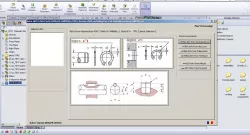
Global SW scripting tools:• Working on ASM: - Info - Open FOLDER - Check if all COMP are in the same ASM-Folder? - Create new ASM from Sellection; - COG of the ASM? - Save ASM as PART - Copy Tree to Clipboard - Rename PARTS into a specific form Nij.xx.nn.kk, etc• Working on Hide/Show: - Show ALL; - Show only sellected; - Hide sellected; - Toggle visibility• Working with Materials: - Easy to define multiple Parts with specific materials • Working with Colors: - Random colors to ASM; - Remove Colors to ASM• Working with PARTS: - Automatically create springs; - Automatically create pipes; - Rescale Parts; - Create GEARS; - Create Curves; - Create UNP sections; - Modify FEATURES - Create various PARTS using scripts• Working with POINTs: - Define Points using coordinates; - Define / Save / Open points with coordinated stored into files• Working with Measuremnts: - Improved tools for measurements with extra informations• Working with Views: - ADD / modify lights• Working with Custom File properties: - Add / modify / save / load predefined custom properties• Working with DRAWINGS: - Save DRW as PDF into specific formats; - create, edit BOMs - working on Skecthes; - Auto Skecth tools; - save as DXF profile; - Import other tables into DRWs; - Auto-Edit Annotations; - Working with Baloons; - Import lines stored into external files.• Additional info about sellection: - nodes, edges, surfaces and addiacent, etc• Working with main-ASM: - Redefine ASM into specific files form Pnnnn.00.00.00, etc• Working with Tolerances: - STAS Tolerances Values and Gaps;• Working with WEB-documents: - Access documents and data over the internet.
Direct link to the original creator's page
More from dragn
Similar Models



Model Specifications
Frequently Asked Questions
How do I download SW scripting tools?
Click the "View on grabcad" button above to visit the original model page on grabcad. You can download the STL file directly from the creator's page for free.
What 3D printer can I use for this model?
This STL file is compatible with most FDM 3D printers (Creality Ender 3, Prusa MK3S+, Bambu Lab, etc.) and resin printers (Elegoo, Anycubic). Check the original page for recommended print settings and materials.
Is this 3D model free to download?
Yes, this model is available as a free download on grabcad. Some creators accept tips or donations.
Can I modify this STL file?
Most STL files can be modified using free software like Blender, TinkerCAD, or Meshmixer. Check the license on the original grabcad page to see if modifications are permitted by the creator.