 prusaprinters
Support test
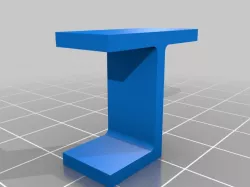
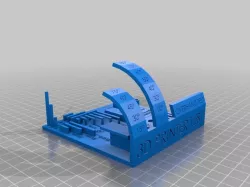
I made this after remixing the all in one 3D printer test (/thing:3718940) because I realized I didn't want to do a full 8 hour print just to see if I was making improvements on my support settings.
Print Settings
Printer Brand:
Creality
Printer:
CR-10
Rafts:
No
Supports:
Yes
Resolution:
0.2
Infill:
100%
Filament:
Sunlu PLA Plus
Orange
Notes:
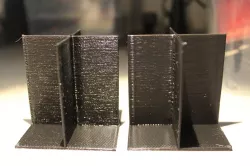
This is a small model at 10 x 22 x 20 and doesn't take too long to print. It will test supports attached to the build plate as well as supports that are sitting on top of your model.
In Cura, I used a 15% support density in zigzag pattern. I also enabled support interface and used 1mm floor/roof thickness, grid pattern at 30% density. For this print at 0.2mm resolution, the bottom Z distance is 0.4 mm while the top Z distance is 0.2. The floor breaks away rather easily from the model and leaves hardly any marks; The roof is a bit harder to remove, but leaves pretty good surface quality on the underside of the supported overhang. I'll still probably drop the interface density down to 20 or 15% and see if it makes any difference to the ease of removal, or reduces overhang quality.
Category: 3D Printing Tests
Direct link to the original creator's page
Also Available On
More from faultydata
Similar Models
 prusaprinters
 prusaprinters
 prusaprinters
 prusaprinters
 prusaprinters
 prusaprinters
 prusaprinters
 prusaprinters
Model Specifications
Frequently Asked Questions
How do I download Support test?
Click the "View on prusaprinters" button above to visit the original model page on prusaprinters. You can download the STL file directly from the creator's page for free.
What 3D printer can I use for this model?
This STL file is compatible with most FDM 3D printers (Creality Ender 3, Prusa MK3S+, Bambu Lab, etc.) and resin printers (Elegoo, Anycubic). Check the original page for recommended print settings and materials.
Is this 3D model free to download?
Yes, this model is available as a free download on prusaprinters. Some creators accept tips or donations.
Can I modify this STL file?
Most STL files can be modified using free software like Blender, TinkerCAD, or Meshmixer. Check the license on the original prusaprinters page to see if modifications are permitted by the creator.