 thingiverse
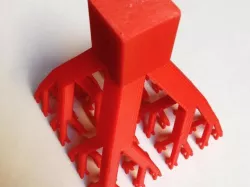
Split Square Tree
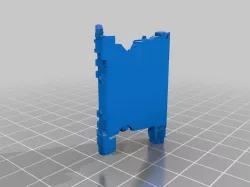
Starts as an extruded square, splits into four pieces which fork upward at an angle to form four new squares. These continue to split until there are 256 squares at the very top. I usually display it upside-down after printing, but have never tried actually printing it this way. Give it a shot if you'd like!
Bonus fact: This sculpture has the exact same cross sectional area from the bottom to the top due to the effect of the splitting. Also, It is exactly 1 square inch.
Print Settings
Printer:
Flashforge Creator Pro
Rafts:
No
Supports:
No
Resolution:
0.2-0.3 mm
Infill:
20%-100%
Notes:
I use Simplify3D settings to give each split a different infill. For the base I do 20%, then going up I do 30%, 50%, 80%, and 100%.
You don't have to do this, but without it, you'll either end up with a rather long print or hollow tips on the end.
Direct link to the original creator's page
More from jarejay

Similar Models
Model Specifications
Frequently Asked Questions
How do I download Split Square Tree?
Click the "View on thingiverse" button above to visit the original model page on thingiverse. You can download the STL file directly from the creator's page for free.
What 3D printer can I use for this model?
This STL file is compatible with most FDM 3D printers (Creality Ender 3, Prusa MK3S+, Bambu Lab, etc.) and resin printers (Elegoo, Anycubic). Check the original page for recommended print settings and materials.
Is this 3D model free to download?
Yes, this model is available as a free download on thingiverse. Some creators accept tips or donations.
Can I modify this STL file?
Most STL files can be modified using free software like Blender, TinkerCAD, or Meshmixer. Check the license on the original thingiverse page to see if modifications are permitted by the creator.