 thingiverse
Simulator button box
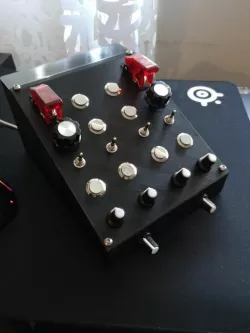
I wanted to make a button box for use with my flight simulators, mainly IL-2 Sturmovik and FS2020. It is registered in windows as a joystick, and can thus be used in any simulator that supports joysticks.The parts are very cheap, and I also got a chinese Arduino Leonardo from banggood.com.
I went ahead and got some cheap parts from ebay:
-2x on/off toggle switches with cover (12mm diameter)
-8x momentary push buttons (16mm diameter)
-2x rotary encoders (6,8mm diameter)
-4x on-off-on momentary switches (5.8mm diameter)
-6x potentiometers (6,8mm diameter)
I then made a box with predesigned holes for the parts I ordered. It has plenty of room for the wiring and the arduino. I included a lid with no holes in it, in case you have different components and just want to drill holes instead. I used 4x M4 screws to secure the lid to the box itself. If I was to make this one all over, I would probably have bought different on-off-on switches. They work but are a bit flimsy. I got a few spares just in case they break :) The rest of the parts work just fine.
Files included are the .stl files for the box and lid, jpeg of the wiring diagram, Gimp file with the wire diagram (so you can choose layers for better visibility), and the mmjoy2 configuration file. NOTE! You can experience ghosting using this wiring diagram. If you want to avoid it you need to add diodes into your wiring. I don't need it because I never press more than one button at a time.
On/off: https://www.ebay.com/itm/12V-Car-Racing-On-Off-Aircraft-Type-Red-LED-Toggle-Switch-Control-Flip-Cover-Red/121917678233?ssPageName=STRK%3AMEBIDX%3AIT&_trksid=p2057872.m2749.l2649
Push button: https://www.ebay.com/itm/5Pcs-16mm-3A-250V-Metal-Waterproof-Push-Button-Momentary-Horn-Switch-Self-Reset/192593620647?ssPageName=STRK%3AMEBIDX%3AIT&_trksid=p2057872.m2749.l2649
Encoders: https://www.ebay.com/itm/15mm-20mm-EC11-Rotary-Shaft-Encoder-with-Push-Switch-5-Pin-Digital-Potentiometer/264242232132?ssPageName=STRK%3AMEBIDX%3AIT&var=563810247320&_trksid=p2057872.m2749.l2649
On/off/on: https://www.ebay.com/itm/10-Pcs-Switch-AC-250V-2A-120V-5A-SPDT-On-Off-On-3-Pins-Momentary-Toggle-Switch/401167217148?ssPageName=STRK%3AMEBIDX%3AIT&_trksid=p2057872.m2749.l2649
Pots: https://www.ebay.com/itm/5Pc-Set-10K-OHM-Terminal-Linear-Taper-Rotary-15mm-Resistor-Potentiometer-Knobs/192730521897?ssPageName=STRK%3AMEBIDX%3AIT&_trksid=p2057872.m2749.l2649
Knobs: https://www.ebay.com/itm/10pcs-Top-Rotary-Control-Turning-Knob-for-Hole-6mm-Dia-Shaft-Potentiometer-Tool/352618907297?ssPageName=STRK%3AMEBIDX%3AIT&_trksid=p2057872.m2749.l2649
Direct link to the original creator's page
Also Available On
More from unicus123
Similar Models
 cults3d
 prusaprinters
 thingiverse
 thingiverse
 thingiverse
 thingiverse
 thingiverse
 thingiverse
Model Specifications
Frequently Asked Questions
How do I download Simulator button box?
Click the "View on thingiverse" button above to visit the original model page on thingiverse. You can download the STL file directly from the creator's page for free.
What 3D printer can I use for this model?
This STL file is compatible with most FDM 3D printers (Creality Ender 3, Prusa MK3S+, Bambu Lab, etc.) and resin printers (Elegoo, Anycubic). Check the original page for recommended print settings and materials.
Is this 3D model free to download?
Yes, this model is available as a free download on thingiverse. Some creators accept tips or donations.
Can I modify this STL file?
Most STL files can be modified using free software like Blender, TinkerCAD, or Meshmixer. Check the license on the original thingiverse page to see if modifications are permitted by the creator.