 GrabCAD
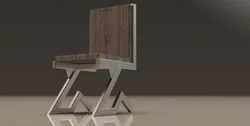
Modern Chair Weldment
Modern Chair Design Using SOLIDWORKS & KeyShot 🪑✨
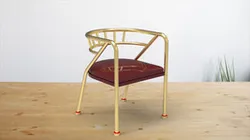
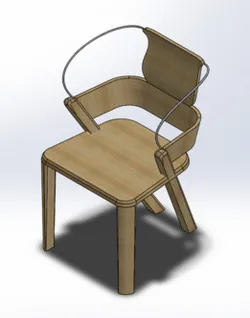
In this project, I designed a modern chair using SOLIDWORKS, utilizing advanced tools like Weldment and 3D Sketching to create a unique frame structure. After completing the design, I performed high-quality rendering using KeyShot to showcase realistic materials and lighting.
🔹 Design & Virtual Manufacturing Steps:
1️⃣ Creating the Base Structure: Used 3D Sketching to draw the main frame, allowing flexibility in shaping the design.
2️⃣ Weldment for Metal Parts: Applied Weldment tools to define the metal sections and ensure proper structural connections.
3️⃣ Adding Aesthetic & Comfort Elements: Included a back cushion and seat for enhanced comfort and aesthetics.
4️⃣ Final Rendering: Used KeyShot to achieve a realistic look, highlighting metal and wood textures with proper lighting.
🎯 Design Goal: To combine durability with a modern aesthetic, making it suitable for contemporary interiors.
🔍 What do you think of the design? Any suggestions for improvement? 🤔💡
Direct link to the original creator's page
More from ZYAD MUSTAFA ELDMATY
Similar Models

Model Specifications
Frequently Asked Questions
How do I download Modern Chair Weldment?
Click the "View on GrabCAD" button above to visit the original model page on GrabCAD. You can download the KEYSHOT, OTHER, RENDERING, SOLIDWORKS file directly from the creator's page for free.
What 3D printer can I use for this model?
This model is compatible with most FDM 3D printers (Creality Ender 3, Prusa MK3S+, Bambu Lab, etc.) and resin printers (Elegoo, Anycubic). Check the original page for recommended print settings and materials.
Is this 3D model free to download?
Yes, this model is available as a free download on GrabCAD. Some creators accept tips or donations.
Can I modify this file?
Check the license (see original page) on the original GrabCAD page. Most STL files can be modified using free software like Blender, TinkerCAD, or Meshmixer.