 Cults3D
Drilling guide
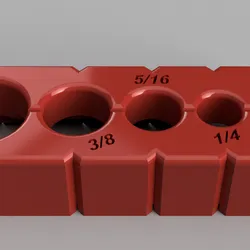
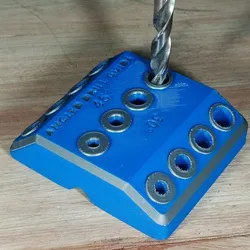
Say goodbye to crooked holes and drilling mishaps! This 3D printable drilling guide is your secret weapon for achieving perfectly centered, straight holes in all your carpentry and DIY projects.
🎯 What Makes This Tool Essential:
6 Common Drill Sizes: 1/8", 3/16", 1/4", 5/16", 3/8", and 1/2" - covers 90% of your drilling needs
Precision Engineering: Each hole is perfectly centered and sized for optimal drill bit guidance
Wobble-Free Design: Stable base ensures your drill stays perfectly perpendicular
Durable Construction: Print in PETG or PLA+ for long-lasting workshop use
⚡ Perfect For:
Furniture Making - Precise holes for dowels, screws, and hardware
Cabinet Installation - Consistent hole spacing for hinges and handles
Craft Projects - Clean, professional-looking holes in wood, plastic, and soft materials
Repair Work - Quick fixes without measuring and marking
Beginner-Friendly - No more drill press needed for straight holes!
💡 Tips:
Print at 0.2mm layer height for smoothest hole surfaces
Use 3+ perimeters for maximum durability
Print in bright colors for easy size identification
Keep multiple guides for different projects
Direct link to the original creator's page
Also Available On
Similar Models
 Thingiverse
 Thangs
 GrabCAD
 Cults3D
 Thingiverse
 Printables
 Printables
 Printables
Model Specifications
Frequently Asked Questions
How do I download Drilling guide?
Click the "View on Cults3D" button above to visit the original model page on Cults3D. You can download the STL file directly from the creator's page for free.
What 3D printer can I use for this model?
This model is compatible with most FDM 3D printers (Creality Ender 3, Prusa MK3S+, Bambu Lab, etc.) and resin printers (Elegoo, Anycubic). Check the original page for recommended print settings and materials.
Is this 3D model free to download?
Yes, this model is available as a free download on Cults3D. Some creators accept tips or donations.
Can I modify this file?
Check the license (see original page) on the original Cults3D page. Most STL files can be modified using free software like Blender, TinkerCAD, or Meshmixer.