 thingiverse
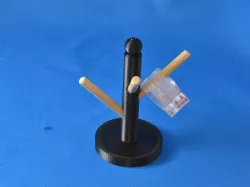
Ring Holder
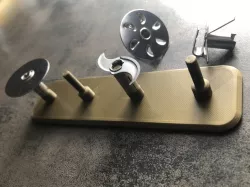
I made this to hold my rings.
Instructions
1) I made this project in inventor
2) I created a new sketch, and made circle. The, I extruded it to about 0.25 inches
3) Then, I made another smaller circle on top of the previous one and extruded it to 3 inches
4) After, I made circles on the pole, extruded them inwards, and deleted them to make the holes on the pole the same size as the poles i was sticking in them.
5) I used the revolution tool to make a sphere on top.
6) Isaved my project as an STL.
7) I was ready to print on the makerbot, so I had to generate a G code
8) Finally, I printed to pole
9) When it was done i just cut wooden poles to 1.5 inches and stuck them in the holes.
Direct link to the original creator's page
Also Available On
More from sanitrad
Similar Models
Model Specifications
Frequently Asked Questions
How do I download Ring Holder?
Click the "View on thingiverse" button above to visit the original model page on thingiverse. You can download the STL file directly from the creator's page for free.
What 3D printer can I use for this model?
This STL file is compatible with most FDM 3D printers (Creality Ender 3, Prusa MK3S+, Bambu Lab, etc.) and resin printers (Elegoo, Anycubic). Check the original page for recommended print settings and materials.
Is this 3D model free to download?
Yes, this model is available as a free download on thingiverse. Some creators accept tips or donations.
Can I modify this STL file?
Most STL files can be modified using free software like Blender, TinkerCAD, or Meshmixer. Check the license on the original thingiverse page to see if modifications are permitted by the creator.