 thingiverse
Replicator feed support
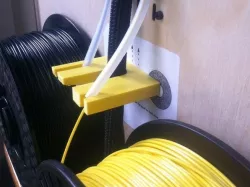
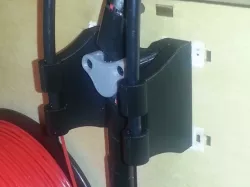
The Replicator's feed tubes lie along the back of the Replicator, but the filament feeds from spools that stick out from the back, especially the left extruder spool which is pushed out 20 mm. So the filament can bind getting pulled across the spool, or even occasionally wrap between the spool and the Replicator. This support bends the feed tubes out so that they're centered over the spools, causing them to feed more smoothly.
Instructions
Make sure that the Replicator's feed tubes have a few inches of loose tube below the clips. If yours is not like this, you may need to unclip the clips and reclip them to the tube.
Print. 10% fill, one shell, is fine.
Move it 200mm in the Y axis (i.e. from the build platform to the back of the Replicator).
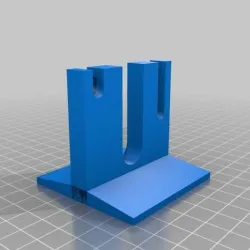
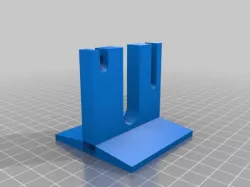
Slide the support under the three cables on the back of the replicator, and position it so that the left extruder's feed tube slides into the shorter slot, and the right extruder's feed tube slides into the longer slot, and the black cable runs through the middle. Rotate it up so that it stands straight out the back of the Replicator. The (black) center cable should move freely, and the two (white) feed tubes will squeeze slightly into the slots. The pressure from the cables will hold it in place against the back of the Replicator.
The attached picture should make everything clear.
Direct link to the original creator's page
Also Available On
More from laird
Similar Models
 thingiverse
 thingiverse
 cults3d
 thingiverse
 thingiverse
 myminifactory
 cults3d
 cults3d
Model Specifications
Frequently Asked Questions
How do I download Replicator feed support?
Click the "View on thingiverse" button above to visit the original model page on thingiverse. You can download the STL file directly from the creator's page for free.
What 3D printer can I use for this model?
This STL file is compatible with most FDM 3D printers (Creality Ender 3, Prusa MK3S+, Bambu Lab, etc.) and resin printers (Elegoo, Anycubic). Check the original page for recommended print settings and materials.
Is this 3D model free to download?
Yes, this model is available as a free download on thingiverse. Some creators accept tips or donations.
Can I modify this STL file?
Most STL files can be modified using free software like Blender, TinkerCAD, or Meshmixer. Check the license on the original thingiverse page to see if modifications are permitted by the creator.