 CrealityCloud
gratuită de Electronics & RC (Remote Control) STL Descărcare - Raspberry Pi Zero 2 W Mini NAS Case - Grootikman
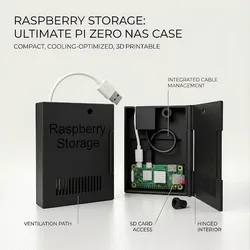
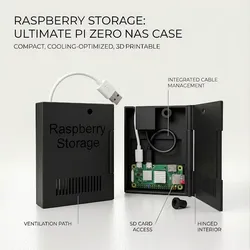
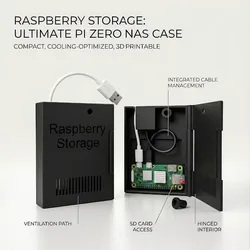
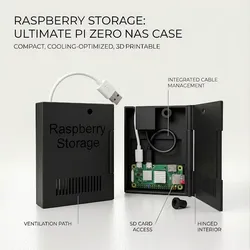
This custom enclosure transforms your Raspberry Pi Zero 2 W into a powerful, low-power Personal Cloud (NAS) and network server. It is specifically optimized for OpenMediaVault (OMV), Pi-hole, and VPN hosting (WireGuard/Tailscale).The design features a dedicated slot for an OTG adapter and uses clever, tool-less assembly.🚀 Key Features:• Easy Assembly: No extra hardware required.• Hinge: Uses a small piece of 1.75mm filament as the pin.• Locking: Closes with a 3D-printed M7 screw (1mm pitch). You can also use a standard metal M7 (1.0 pitch) screw.• Hardware Integration: Specifically designed for the UGREEN Micro USB OTG Adapter.• Cooling: Built-in ventilation slots to keep the Pi Zero 2 W cool during 24/7 operation.🛠️ What You’ll Need:1. Raspberry Pi Zero 2 W2.Micro SD Card3. UGREEN Micro USB OTG Adapter - https://www.amazon.com/UGREEN-Adapter-Samsung-Controller-Smartphone/dp/B00LN3LQKQ?th=14. Any USB Drive (Flash drive or External HDD/SSD)5. A short piece of 1.75mm Filament (for the hinge)⚙️ Print Settings:• Resolution: 0.2 mm (Crucial for the M7 thread accuracy)• Supports: YES (Required for internal overhangs and text details)• Infill: 15 - 20%• Filament: PLA or PETG☕ Support My WorkIf you like my design and want to support more projects like this, you can buy me a coffee here:https://ko-fi.com/sameulprintitThank you for your support!
Direct link to the original creator's page
More from Grootikman
 CrealityCloud
 Printables
 CrealityCloud
 CrealityCloud
 CrealityCloud
 CrealityCloud
Similar Models
 CrealityCloud
 CrealityCloud
CrealityCloud
CrealityCloud
 Thangs
 Thingiverse
 GrabCAD
 Thingiverse
 Thingiverse
Model Specifications
Frequently Asked Questions
How do I download gratuită de Electronics & RC (Remote Control) S...?
Click the "View on CrealityCloud" button above to visit the original model page on CrealityCloud. You can download the STL file directly from the creator's page for free.
What 3D printer can I use for this model?
This model is compatible with most FDM 3D printers (Creality Ender 3, Prusa MK3S+, Bambu Lab, etc.) and resin printers (Elegoo, Anycubic). Check the original page for recommended print settings and materials.
Is this 3D model free to download?
Yes, this model is available as a free download on CrealityCloud. Some creators accept tips or donations.
Can I modify this file?
Check the license (CC BY) on the original CrealityCloud page. Most STL files can be modified using free software like Blender, TinkerCAD, or Meshmixer.