 thingiverse
Range Commands Timer
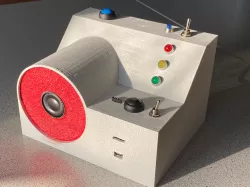
This Thing which I recently developed can be used as a timer for e.g. range commands.
Ít can be programmed to give commands like:
a) "For the next competition - Load"
b) "Start"
c) "STOP"
LEDs indicate: Power on, Stop (RED), Get ready (YELLOW), Shoot (GREEN).
A built-in amplifier PAM 8404 and loudspeaker give you clear commands. The commands have been created by using Text-To-Speech applications, then edited a bit with an audio editor. I made three commands: see above a, b, c.
They are all in mp3-format, and are saved on a micro-SD-card, for the DFPlayer-mini.
An Arduino Nano and additional LEDs, wires, resistors, battery, connectors, push-buttons and switches complete the investment. I guess this is in a $15 range, including PLA-filament.
Modes:
- You have 3 modes of operation:
1. - Ext.: use external switch (foot switch, other) to start the operation per shot!
2. - Push Buttopn: use Start push-button to start
3. - Auto: set right switch from right position (Auto-OFF) to left (Auto-ON). Then after STOP command, it automatically restarts after a couple of seconds.
Reset button for resetting the Arduino.
Operation:
- Power on (Blue LED lits up)
- Start with 1. or 2. or 3.
- Yellow LED lights up, a voice says: ...For the next competition - LOAD...
- Then.. START (Green LED). Then you have 50 seconds time to make your execution of what ever you are practicing.
- After 40 seconds Yellow LED lights up, indicating you to speed up with that. Your last 10 seconds are elapsing....
- 50 seconds after START the Red LED comes up, STOP is the command.
- Few seconds later Red LED shuts off. You are ready for the next round.
This is very useful for training purposes, it makes fun and it made a lot of fun creating it.
Direct link to the original creator's page
More from trierscheid
Similar Models
 grabcad
 grabcad
 thingiverse
 thingiverse
 thingiverse
 thingiverse
 cults3d
 thingiverse
Model Specifications
Frequently Asked Questions
How do I download Range Commands Timer?
Click the "View on thingiverse" button above to visit the original model page on thingiverse. You can download the STL file directly from the creator's page for free.
What 3D printer can I use for this model?
This STL file is compatible with most FDM 3D printers (Creality Ender 3, Prusa MK3S+, Bambu Lab, etc.) and resin printers (Elegoo, Anycubic). Check the original page for recommended print settings and materials.
Is this 3D model free to download?
Yes, this model is available as a free download on thingiverse. Some creators accept tips or donations.
Can I modify this STL file?
Most STL files can be modified using free software like Blender, TinkerCAD, or Meshmixer. Check the license on the original thingiverse page to see if modifications are permitted by the creator.