 thingiverse
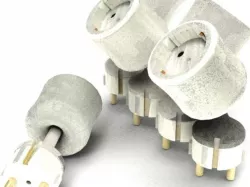
Power Plug
The idea is to connect additional electronics to a power socket device that would turn it into a zigbee power meter. From then on we can communicate with the sockets and:
Gather information about the current energy consumption - once we have it we can analyze, compare, learn from it and finally be more energy efficient
Control – both the energy consumption and your workflow at home. Describe what you want to achieve in the Agilart Designer and control your home from a simple Dashboard you can access from all your gadgets
learn how to SAVE more ENERGY
** Designed together with Kris Kalinov as part of the Power Home team at Startup Weekend Sofia
** Won Startup Weekend Sofia: http://sofia.startupweekend.org/2012/09/24/powerhome-wins/
Instructions
The idea is that we will add aditional electonics to the normal socket. Then we will be able to control it over the web from all our other gadgets. Here you can see a tutorial on how to create a DIY prototype that will allow you to switch on and off the lights at home from a web site or from your phone.
For the prototype you will need:
Raspberry Pi/Arduino
a relay (5V DC coil)
NPN transistor
a diode
1K resistor
protoboard
some Jumper wires
You can use the relay circuit in the images to connect the electronics in the right way. Check here: http://www.agilart.com/blog/agilart-showcase-wins-startup-weekend-sofia and here: http://www.susa.net/wordpress/2012/06/raspberry-pi-relay-using-gpio/ for the details. Then you will need to be able to control the relay remotely. You can do this by running a Web Server on the Raspberry Pi/Arduino and send commands to it. You can use the REST API - http://en.wikipedia.org/wiki/Representational_state_transfer to send simple GET, POST, PUT and DELETE request to your web server. You can create a html page where you can use very simple javascipt and jQuery code to send these request over HTTP. Look here: http://api.jquery.com/jQuery.post/ Then, when you receive the commands on the server side you will need to control the GPIOs of your Raspberry Pi/Arduino - the target GPIO will control the relay which would switch on or off the lamp. The general idea is to have all this electronics in the power plug and control the power plug with the relay. You can do this in several ways. Here we have used the Agilart opensource project: http://www.agilart.com/. In order to get data back from your devices and monitor what's happening, you can upload the data to an online feed, for example using cosm/pachube. Look here: https://cosm.com/how_it_works You can do this very easily using a file transfer libraries like curl and curlpp: http://curl.haxx.se/
In our case, we've used the Open Source Agilart Runtime project to run a web server on the Raspberry Pi and send commands to it over HTTP from the Web. It also allows you to publish data to online feeds: http://www.agilart.com/blog/agilart-programs-using-cosm
More resources:http://powerhome.me/http://agilart.com
If you have any questions, suggestions, remarks, I'd love to hear them!
Thanks
Direct link to the original creator's page
Also Available On
Similar Models
 thingiverse
 thingiverse
 thingiverse
 thingiverse
 thingiverse
 cults3d
 thingiverse
 grabcad
Model Specifications
Frequently Asked Questions
How do I download Power Plug?
Click the "View on thingiverse" button above to visit the original model page on thingiverse. You can download the STL file directly from the creator's page for free.
What 3D printer can I use for this model?
This STL file is compatible with most FDM 3D printers (Creality Ender 3, Prusa MK3S+, Bambu Lab, etc.) and resin printers (Elegoo, Anycubic). Check the original page for recommended print settings and materials.
Is this 3D model free to download?
Yes, this model is available as a free download on thingiverse. Some creators accept tips or donations.
Can I modify this STL file?
Most STL files can be modified using free software like Blender, TinkerCAD, or Meshmixer. Check the license on the original thingiverse page to see if modifications are permitted by the creator.