 thingiverse
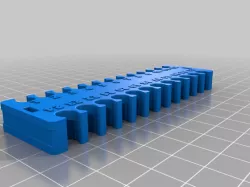
Patch Panel Cable Support
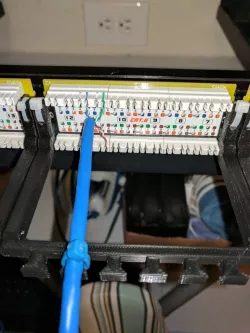
Very narrow thing here, but maybe someday, someone will dig it! I recently wired my house with Ethernet and have all wires terminate centrally at a patch panel. I thought of a 'better way' to manage and support the cables for my patch panel. The patch panel manufacturer's design implies the cables will waterfall over each other and then be zip-tied. Problem with this is you have to undue most wire management [when adding or replacing wire] and terminate wires in a cascading order.
This design was inspired by youtuber Fiberninja's video "Working with Keystone Patch Panel" https://www.youtube.com/watch?v=YgBSpYiJQHM . He is awesome.
The design is specific for the patch panel "Cable Matters Rackmount or Wallmount 24-Port Cat6 RJ45 Patch Panel" found on Amazon: https://www.amazon.com/Cable-Matters-Rackmount-Wallmount-24-Port/dp/B0072K1OWY/ref=sr_1_1_sspa?ie=UTF8&qid=1507480276&sr=8-1-spons&keywords=cable+matters+cat6+patch+panel&psc=1 . It might work on other panels, but I am not sure. Please post in the comments if you find that this thing can be applied to other types of patch panels.
Installation - Requires two small zip ties. Insert zip ties through wholes in cable support arms and through the back of the patch panel's top zip tie anchors. Don't over tighten zip ties as you want the cable support arms to be able to be pushed up so that you have access for your punch down tool. After punching down cable to patch panel, zip tie Ethernet cable to the extended portion of the cable support arm. Do not over tighten as you will want the cables to be able to move when you push the cable support arm up.
Direct link to the original creator's page
More from dhammon1
Similar Models
 grabcad
 grabcad
 thingiverse
 thingiverse
 thingiverse
 cgtrader
 thingiverse
 thingiverse
Model Specifications
Frequently Asked Questions
How do I download Patch Panel Cable Support?
Click the "View on thingiverse" button above to visit the original model page on thingiverse. You can download the STL file directly from the creator's page for free.
What 3D printer can I use for this model?
This STL file is compatible with most FDM 3D printers (Creality Ender 3, Prusa MK3S+, Bambu Lab, etc.) and resin printers (Elegoo, Anycubic). Check the original page for recommended print settings and materials.
Is this 3D model free to download?
Yes, this model is available as a free download on thingiverse. Some creators accept tips or donations.
Can I modify this STL file?
Most STL files can be modified using free software like Blender, TinkerCAD, or Meshmixer. Check the license on the original thingiverse page to see if modifications are permitted by the creator.