 prusaprinters
Parametric Flashlight Diffuser
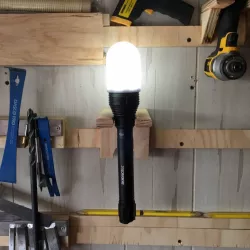
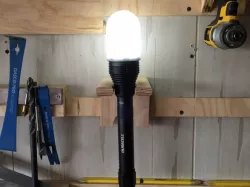
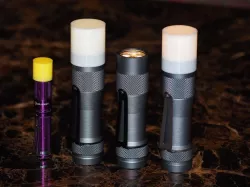
This module produces a diffuser cap for flashlights so they can be used for ambient lighting.For obvious reasons, this works best with translucent filaments (I've been using MatterHackers' Clear Translucent Pro PLA).InstructionsPrint test parts to dial in the proper diameter:Measure the widest point at the top of your flashlight.Set the diameter property to this value plus .5-1mm toaccount for thermal shrinkage.Set the diffuser_type to None.Set any additional configuration properties that you want.Print your part and test the fit of the slip-on ring.Repeat until the slip-on ring fits. Once you have a good fit for the ring, set the diffuser_type value back to Dome and print your final product with as little infill as you can get away with (0-10% seems to work fine, depending on the diameter).This OpenSCAD library is part of the dotscad project, an open collection of modules and Things for 3d printing. Please check there for the latest versions of this and other related files, or to contribute.Category: Tools
Direct link to the original creator's page
Also Available On
More from nerd
Similar Models
 thingiverse
 thingiverse
 thingiverse
 prusaprinters
 prusaprinters
 prusaprinters
 prusaprinters
 prusaprinters
Model Specifications
Frequently Asked Questions
How do I download Parametric Flashlight Diffuser?
Click the "View on prusaprinters" button above to visit the original model page on prusaprinters. You can download the STL file directly from the creator's page for free.
What 3D printer can I use for this model?
This STL file is compatible with most FDM 3D printers (Creality Ender 3, Prusa MK3S+, Bambu Lab, etc.) and resin printers (Elegoo, Anycubic). Check the original page for recommended print settings and materials.
Is this 3D model free to download?
Yes, this model is available as a free download on prusaprinters. Some creators accept tips or donations.
Can I modify this STL file?
Most STL files can be modified using free software like Blender, TinkerCAD, or Meshmixer. Check the license on the original prusaprinters page to see if modifications are permitted by the creator.