 thingiverse
Pac-Man
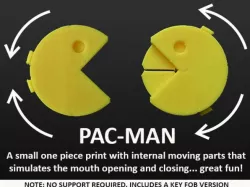
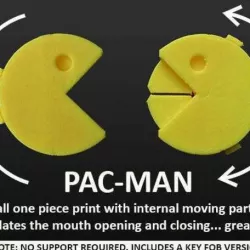
Pac-Man fans will appreciate this small (32mm diameter body) one piece fun print that features a mouth that opens wide / closes tight shut and everything in between... just like Pac-Man. Two .stl's have been provided. One is a 'just for fun' model. The other includes a key fob fitting (In the most practical place for reliable printing).
A larger more practical version of this design is my Pac-Man Containers which is available at http://www.thingiverse.com/thing:1754407. In this file the mouth parts are internally moving drawers to store small things like mints / sweets etc.
This should be an easy PLA print for anyone with a good slicing app and accurate machine with a filament fan. This is important due to the fine detail and clearances as well as the extreme angles applied... when printed well they work great and are fun little things that amaze people.
The design must be printed face down (as per he .stl's provided) to keep the internal parts separated from the outer structure. Adequate clearances have been applied to work for most machines so the mouth should be free to move straight off the build plate (... once the raft is removed).
Please do not use any automated support. This will permanently fuse the parts together. This print does not require any support but Raft with 4 - 5mm outset if required to ensure good build plate adhesion through the minimal contact areas.
If the parts stick and won't move post-printing a gentle amount of pressure is all that should be required to free them to move. You may also need to check there is not excess filament in the mouth area causing the parts to fuse together slightly.
3D prints with moving parts often don't move smoothly because the surfaces that come in contact with each other are slightly rough / imperfect. If you want to make the mouth parts in this print rotate smoothly and fast a quick spray with some silicone spray is your solution (Refer images).
Please refer to the print settings / instructions and images for additional information. These Have been test printed numerous times on Makerbot Replicator 2's and 5th Gen. MakerBot's with consistently great results (as shown in he photos). .
Note: If you like this check out the rest of my fun and practical designs.... and post images of your Pac-Man prints!
Print Settings
Printer Brand:
MakerBot
Printer:
MakerBot Replicator 2
Rafts:
Yes
Supports:
No
Resolution:
Standard / 0.20mm
Infill:
2 shells / 20% or more infill.
Notes:
Prints well in PLA on machines with a filament fan. This is necessary due to the extreme angles used.
Do not use any automated support. This will fuse the internal moving parts.
Post-Printing
Remove the raft, free up the mouth parts and have fun with your Pac-Man!
On a well set up machine and with a good slicing app the mouth parts should free up easily post-printing, Just gently push on the tabs and/or internal mouth parts to start the rotation.
If not, chances are it will be a fraction of excess filament around the mouth area. Clean it away and your mouth parts should be free to moves.
If the mouth parts do not move smoothly (due to the internal 3D printed surface texture) a light spray with some silicone lubricant can get them moving with next to no friction.
Direct link to the original creator's page
Also Available On
More from muzz64
Similar Models
Model Specifications
Frequently Asked Questions
How do I download Pac-Man?
Click the "View on thingiverse" button above to visit the original model page on thingiverse. You can download the STL file directly from the creator's page for free.
What 3D printer can I use for this model?
This STL file is compatible with most FDM 3D printers (Creality Ender 3, Prusa MK3S+, Bambu Lab, etc.) and resin printers (Elegoo, Anycubic). Check the original page for recommended print settings and materials.
Is this 3D model free to download?
Yes, this model is available as a free download on thingiverse. Some creators accept tips or donations.
Can I modify this STL file?
Most STL files can be modified using free software like Blender, TinkerCAD, or Meshmixer. Check the license on the original thingiverse page to see if modifications are permitted by the creator.