 thingiverse
Macro Tubes
# 3D Print your Macro Photography - Macro Tubes
### In Brief
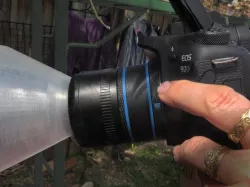
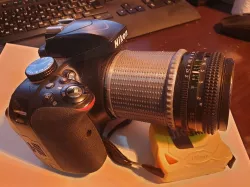
Use this kit to create great macro photographs with your ordinary Canon EF or EFS lenses. The kit is designed to be flexible so it can cover a wide range of macro needs.
### The Series
The tubes are part of a collection of 3D printed macro photography tools:
+ Reverse lens adaptor. ([Here](https://www.thingiverse.com/thing:4944183))
+ Lens hood for reversed lenses ([Here](https://www.thingiverse.com/thing:4944183))
+ Diffuser for reversed lenses ([Here](https://www.thingiverse.com/thing:4944183))
+ Specimen/object mount ([Here](https://www.thingiverse.com/thing:4935214)).
+ A coupled reversed lens adaptor. ([Here](https://www.thingiverse.com/thing:4950226))
+ **Macro tube kit This Thing!**
+ Box to carry adaptors ([Here](https://www.thingiverse.com/thing:4966184))
+ Manual slider rail for focus stacking (Due End Oct 2021).
+ Fully automated slider rail for focus stacking (Due November 2021).
+ Micro adaptor (In planning)
All tools are detailed in a series of [Instructables](https://www.instructables.com/3D-Print-Your-Macro-Photography-Part-1-Introductio/) called 3D Print your Macro Photography
## How they work
Macro tubes or 'extension' tubes move the lens away from the focal plane, which brings the closest focus point closer to the front element. As a result, your subject will be larger in the frame.
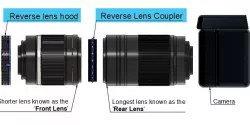
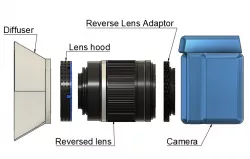
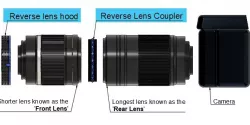
This system uses three 'stages' screwed together. Each stage offers several choices, and their combination allows flexibility. Choose the combination that suits the circumstance.
## The kit
1. **Camera mount:**. (Only one at this point as I only have the Canon to model from)
2. **Tubes:**: Choice of no tube, 13mm effective, short tube 21mm effective, long tube 31mm effective, long plus short tube 39mm effective, customised.
3. **Lens Mount:** 52mm reverse adaptor, 58mm reverse adaptor, EF/EFs mount.
## Customized tube length
The OpenSCAD script I created won't work in Thingiverse because Thingiverse does not cope with external libraries. However, you can download OpenSCAD, [the libraries](https://github.com/revarbat/BOSL20) and my script to create .stl files.
## How to use
1. Assemble the Macro kit (Camera mount, tube, lens adaptor)
2. Mount assembled macro set to camera
3. Mount lens
## No automatic control over lens
My adaptor doesn't electronically connect your camera to the lens, so that you will lose control over focus and aperture.
1. **Focus:** This isn't a loss because, generally, autofocus does not work well at the macro level. You will be able to use focus peaking and electronic enlargement to help focus. Generally, the best approach is to set your lens on minimum focus the move your camera back and forward to get focus.
2. ** Aperture:** You must set the aperture before taking the lens off the camera. When you take it off, hold down the 'depth of field button'. This method will freeze the lens on the current aperture setting. (More details on this in the Instructable)
A detailed [Instructable](https://www.instructables.com/3D-Print-Your-Macro-Photography-Part-4-Macro-Tubes/) is available.
.
Direct link to the original creator's page
Also Available On
More from dingolingo
Similar Models
 prusaprinters
 thingiverse
 thingiverse
 thingiverse
 thingiverse
 thingiverse
 thingiverse
 prusaprinters
Model Specifications
Frequently Asked Questions
How do I download Macro Tubes?
Click the "View on thingiverse" button above to visit the original model page on thingiverse. You can download the STL file directly from the creator's page for free.
What 3D printer can I use for this model?
This STL file is compatible with most FDM 3D printers (Creality Ender 3, Prusa MK3S+, Bambu Lab, etc.) and resin printers (Elegoo, Anycubic). Check the original page for recommended print settings and materials.
Is this 3D model free to download?
Yes, this model is available as a free download on thingiverse. Some creators accept tips or donations.
Can I modify this STL file?
Most STL files can be modified using free software like Blender, TinkerCAD, or Meshmixer. Check the license on the original thingiverse page to see if modifications are permitted by the creator.