 cults3d
Layout Square
Carpenter's squares with a large lip along one side are great for marking a line perpendicular to the side of a piece of lumber. But that lip gets in the way in any other orientation, lifting the square off the plane making markings inaccurate.
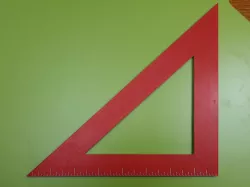
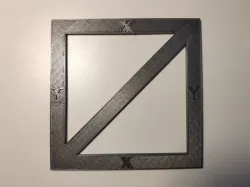
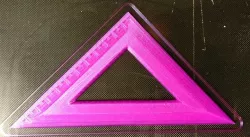
Hence the lip-less layout square. This layout square is designed completely for imperial measurements such as those used in North America for woodworking. The arms are exactly one inch across and its exactly one eighth inch thick. The perpendicular arms are exactly eight inches along and the scale is notched along one arm, on both sides, in one sixteenth increments. You do not need supports to print this.
There are seven versions included so you can choose the one that will be perfectly square even if your printer's gantry and bed are not perfectly square to each other. They are numbered 09925, 09950, 09975, 10000, 10025, 10050, 10075 for stretching along the diagonal from -3/4% to +3/4% in 1/4% increments. My printer required it to be stretched by +1/2% so I chose the file numbered 10050 (1.005% stretch).
I suggest printing the 10000 file (no stretched skew) first then determining if its square (if your printer is square) or whether you need a positive stretch or negative 'squish'. You don't have to print the whole model, only three layers in my estimation.
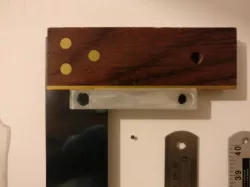
How do you determine if its square? You can compare to a known square like I did with my carpenters square. Or you can print two and put them together on a known straight edge and see if there's a gap in between at the top. See my photos showing that.
I printed mine in two colours, red on top and bottom sandwiching a middle light grey. You don't have to do this because the markings are actual recesses, you'll see them without the contrasting colour. But if you want to try two colours you don't have to have a two colour printer because the colours aren't mixed on the same layer. You only need to insert pauses at the layers that need a colour swap.
Direct link to the original creator's page
Also Available On
More from donbarthel


Similar Models

Model Specifications
Frequently Asked Questions
How do I download Layout Square?
Click the "View on cults3d" button above to visit the original model page on cults3d. You can download the STL file directly from the creator's page for free.
What 3D printer can I use for this model?
This STL file is compatible with most FDM 3D printers (Creality Ender 3, Prusa MK3S+, Bambu Lab, etc.) and resin printers (Elegoo, Anycubic). Check the original page for recommended print settings and materials.
Is this 3D model free to download?
Yes, this model is available as a free download on cults3d. Some creators accept tips or donations.
Can I modify this STL file?
Most STL files can be modified using free software like Blender, TinkerCAD, or Meshmixer. Check the license on the original cults3d page to see if modifications are permitted by the creator.