 thingiverse
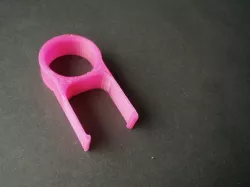
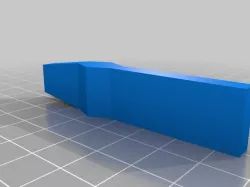
Keycap puller
Inspired by the "Keyboard Key Puller/Remover" by TBRIshtar, http://www.thingiverse.com/thing:463824
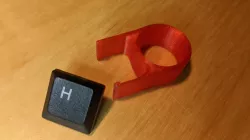
Friend needed one, so I decided to print one for him. It works well but took quite a bit of force to depress into the keycaps (similar to the one that came with my Ducky keyboard). Turns out the prongs are too wide apart and thick.
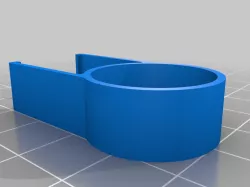
My version has thinner prongs and are narrower apart. The tips have been made stubbier but lower in height. This gives more clearance around keycaps, especially the Esc button. The net result is the keycap puller slips into the keycap with reduced force . Also added fillet to the prongs to relief stress concentration (for the heck of it). Finger hole is circle because FreeCAD doesn't support elipses.
Attached FreeCAD file.
Print Settings
Printer:
New Matter MOD-t
Rafts:
Yes
Supports:
No
Resolution:
0.2mm
Infill:
25%
Notes:
My experience with the New Matter MOD-t led me to recommend raft with all thin profile prints. This was no exception as many prints failed due to bed adhesion with this printer. YMMV.
Direct link to the original creator's page
Also Available On
Similar Models
Model Specifications
Frequently Asked Questions
How do I download Keycap puller?
Click the "View on thingiverse" button above to visit the original model page on thingiverse. You can download the STL file directly from the creator's page for free.
What 3D printer can I use for this model?
This STL file is compatible with most FDM 3D printers (Creality Ender 3, Prusa MK3S+, Bambu Lab, etc.) and resin printers (Elegoo, Anycubic). Check the original page for recommended print settings and materials.
Is this 3D model free to download?
Yes, this model is available as a free download on thingiverse. Some creators accept tips or donations.
Can I modify this STL file?
Most STL files can be modified using free software like Blender, TinkerCAD, or Meshmixer. Check the license on the original thingiverse page to see if modifications are permitted by the creator.