 thingiverse
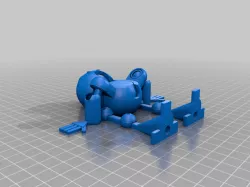
JointBot
JointBot 1.0
After 10 iterations of the JointBot alpha release, I'm happy to announce JointBot 1.0! Fully-articulated and print-in-place. This is part of my final project for the DDF510 CAD1 class at SUNY New Paltz Digital Design and Fabrication grad program.
Printing tips:
Since the first few layers print extra-gooey and run together, JointBot's joints can be tough to separate. Go slow and avoid 'snapping' them out. Instead, use your fingernail or a spudger to separate the housing from the joint. Use slow rotation (again, no lateral snapping) to work the joints free. If you are confident in your platform adhesion, print the first few layers thinner than the rest of JointBot -- it will give more clearance between ball and housing.
Direct link to the original creator's page
Also Available On
More from sciamop
Similar Models
 thingiverse
 thingiverse
 myminifactory
 cults3d
 thingiverse
 thingiverse
 thingiverse
 grabcad
Model Specifications
Frequently Asked Questions
How do I download JointBot?
Click the "View on thingiverse" button above to visit the original model page on thingiverse. You can download the STL file directly from the creator's page for free.
What 3D printer can I use for this model?
This STL file is compatible with most FDM 3D printers (Creality Ender 3, Prusa MK3S+, Bambu Lab, etc.) and resin printers (Elegoo, Anycubic). Check the original page for recommended print settings and materials.
Is this 3D model free to download?
Yes, this model is available as a free download on thingiverse. Some creators accept tips or donations.
Can I modify this STL file?
Most STL files can be modified using free software like Blender, TinkerCAD, or Meshmixer. Check the license on the original thingiverse page to see if modifications are permitted by the creator.