 thingiverse
iPad Mini Stand
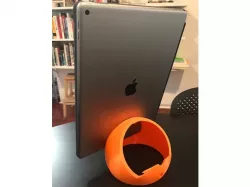
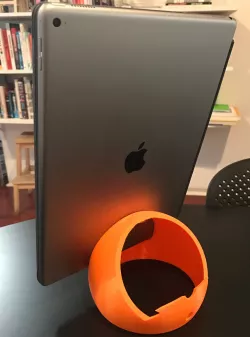
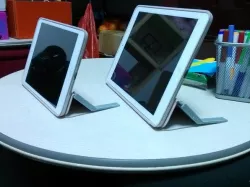
One-piece iPad stand with two angles. Can be printed for iPad Pro (pictured) with 150mm diameter, or smaller iPads by changing the diameter.
The stand is parametric. Using the OpenSCAD file, can be printed on a MakerBot Mini, for use with an iPad Mini using 100mm diameter. Yes, Mini begets Mini! I hope mini people find this useful.
The OpenSCAD files are found here:https://github.com/thrasher/ipad-mini-stand
Write.scad found here:https://github.com/rohieb/Write.scadhttp://www.thingiverse.com/thing:16193/
Update: The inside-sphere writing has been removed in the .stl posted here.
Print Settings
Printer Brand:
MakerBot
Printer:
MakerBot Replicator Mini
Rafts:
Yes
Supports:
No
Resolution:
0.1mm
Infill:
10%
Notes:
Use 3 shells to give the outside strength, and to allow the overhang in the middle of the sphere to print better. Note: the maximum build size of a MakerBot Mini is 10cm, which will work for holding an iPad Mini, or for 40 deg angles, a regular iPad Air. Use the OpenSCAD file to change these values, create a new .stl, and print.
How I Designed This
Originally designed to hold an iPad for my wife. She wanted to easily read, at a steeper angle than was provided by the iPad's case/cover. I wanted to support the iPad, but also other tablets, with or without covers. I also wanted to be able to add custom text, but on the inside of the sphere, so it wasn't overt. The Write.scad library works for this, though a little hack is needed for writing on the inside of a sphere.
Direct link to the original creator's page
Also Available On
More from gogodoit
Similar Models
Model Specifications
Frequently Asked Questions
How do I download iPad Mini Stand?
Click the "View on thingiverse" button above to visit the original model page on thingiverse. You can download the STL file directly from the creator's page for free.
What 3D printer can I use for this model?
This STL file is compatible with most FDM 3D printers (Creality Ender 3, Prusa MK3S+, Bambu Lab, etc.) and resin printers (Elegoo, Anycubic). Check the original page for recommended print settings and materials.
Is this 3D model free to download?
Yes, this model is available as a free download on thingiverse. Some creators accept tips or donations.
Can I modify this STL file?
Most STL files can be modified using free software like Blender, TinkerCAD, or Meshmixer. Check the license on the original thingiverse page to see if modifications are permitted by the creator.