 CrealityCloud
Creality Cloud | Basketball Dunk - Hueforge - 3 Colors | ملفات الطابعة ثلاثية الأبعاد
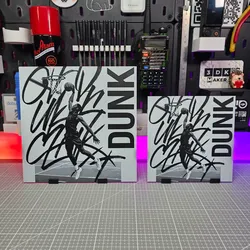
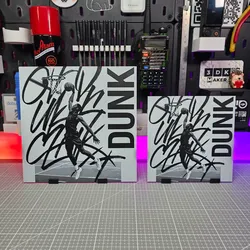
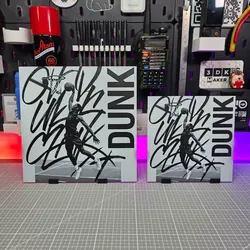
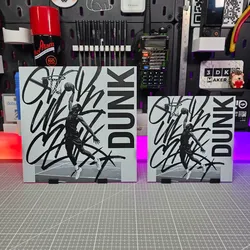
Capture the energy of the game with this dynamic Basketball Dunk Hueforge 3D print. Featuring three layered colors and bold contrast, it portrays the power and motion of a slam dunk in artistic style — perfect for sports fans, gym decor, or modern wall art displays.You can find my other models of the same type on my profile.Print at 100% infill with a layer height of 0.08mm with a base layer of 0.16mmYou may print at higher layer heights below the Base Thickness of 0.96mmThe Max allowed Thickness is 2mm and the Actual Thickness is 1.84mm #000000 PLA BambuLab Basic Black Transmission Distance: 0.6 #4c5f71 PLA BambuLab Basic Blue Gray Transmission Distance: 3 #ffffff PLA BambuLab Basic Jade White Transmission Distance: 5This print uses 3 unique filamentsSwap Instructions: Start with Black At layer #12 (1.04mm) swap to Blue Gray At layer #16 (1.36mm) swap to Jade White for the rest.
Direct link to the original creator's page
More from 3DK Maker
 CrealityCloud
 CrealityCloud
 CrealityCloud
 CrealityCloud
 CrealityCloud
 CrealityCloud
Similar Models
 CrealityCloud
 CrealityCloud
 CrealityCloud
 CrealityCloud
 CrealityCloud
 CrealityCloud
 CrealityCloud
 CrealityCloud
Model Specifications
Frequently Asked Questions
How do I download Creality Cloud | Basketball Dunk - Hueforge - 3...?
Click the "View on CrealityCloud" button above to visit the original model page on CrealityCloud. You can download the 3MF, STL file directly from the creator's page for free.
What 3D printer can I use for this model?
This model is compatible with most FDM 3D printers (Creality Ender 3, Prusa MK3S+, Bambu Lab, etc.) and resin printers (Elegoo, Anycubic). Check the original page for recommended print settings and materials.
Is this 3D model free to download?
Yes, this model is available as a free download on CrealityCloud. Some creators accept tips or donations.
Can I modify this file?
Check the license (see original page) on the original CrealityCloud page. Most STL files can be modified using free software like Blender, TinkerCAD, or Meshmixer.