 Thingiverse
Handicap Button for Training Service Dogs to Open Doors
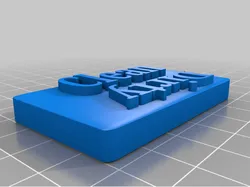
This is a cover for the programmable "talk" buttons you can buy on Amazon. The cover and logo are printed separately to simplify the painting of the cover with spraypaint and to eliminate the need for supports. Print out the parts. rattle can the cap blue, then glue on the wheelchair guy. affix this to the talk button (I used double sided foam tape). Affix magnets, suction cups, or velcro to the back of the button and place it on a vertical surface. Mine is on my fridge and at head level for the dog. Program in whatever command you want the dog to use for opening doors, like "door". By having it low and then moving it higher on the surface later, you can reach the 36" that most buttons are mounted. I added a base for the talk button that makes battery changes possible but also holds a large harbor freight disk magnet (80mm) firmly to the back. The exact buttons I use for training dogs are found at https://amzn.to/4k90zot as an Amazon affiliate I earn a small commission for items ordered through that link at no expense to you.
Direct link to the original creator's page
More from 1337gallagher

Similar Models
 Thingiverse
 Thingiverse
 Thingiverse
 Thingiverse
 Printables
 Thingiverse
 Printables
 Thingiverse
Model Specifications
Frequently Asked Questions
How do I download Handicap Button for Training Service Dogs to Op...?
Click the "View on Thingiverse" button above to visit the original model page on Thingiverse. You can download the STL file directly from the creator's page for free.
What 3D printer can I use for this model?
This model is compatible with most FDM 3D printers (Creality Ender 3, Prusa MK3S+, Bambu Lab, etc.) and resin printers (Elegoo, Anycubic). Check the original page for recommended print settings and materials.
Is this 3D model free to download?
Yes, this model is available as a free download on Thingiverse. Some creators accept tips or donations.
Can I modify this file?
Check the license (see original page) on the original Thingiverse page. Most STL files can be modified using free software like Blender, TinkerCAD, or Meshmixer.