 thingiverse
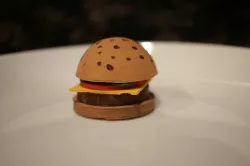
Hambuger
[BlocksCAD](http://www.blockscad3d.com/) is a free online software designed to teach students coding and Computer Aided Design. Using BlocksCAD, students will design a 3D Hamburger. Students will practice skills they are familiar with: creating shapes, using translation, rotation (optional) and learn to implement difference to create the top bun of the hamburger. Students will be exposed to computational thinking to construct something they can 3D print!
Note: in order to print this model, print each part of the hamburger separately. We recommend printing in a light color and then coloring the pieces with permanent markers.
The Hamburger Activity is best for 3rd - 6th grade for students with basic BlocksCAD experience.
As a Teacher you can create a free trial of our [BlocksCAD for Education](https://www.blockscad3d.com/educators/) platform. From here you can create classes with unique join codes and manage student work.
Direct link to the original creator's page
More from blockscad




Similar Models




Model Specifications
Frequently Asked Questions
How do I download Hambuger?
Click the "View on thingiverse" button above to visit the original model page on thingiverse. You can download the STL file directly from the creator's page for free.
What 3D printer can I use for this model?
This STL file is compatible with most FDM 3D printers (Creality Ender 3, Prusa MK3S+, Bambu Lab, etc.) and resin printers (Elegoo, Anycubic). Check the original page for recommended print settings and materials.
Is this 3D model free to download?
Yes, this model is available as a free download on thingiverse. Some creators accept tips or donations.
Can I modify this STL file?
Most STL files can be modified using free software like Blender, TinkerCAD, or Meshmixer. Check the license on the original thingiverse page to see if modifications are permitted by the creator.