 thingiverse
GCodeInfo
This is a small command line tool to analyse gcodes. It calculates various print details like
-print time
-used filament
-yx move distance
-print object dimension
-average print speeds
-number of layers
-layer details
-speed distribution
-weight and price of the printed object
... UPDATE 0.98 Now with edit mode (experimental) **
Change the print speed by percent
Change the extrusion rate by percent
Change the Layerheight by percent (+increase extrusion)
Modify extruder temperatur (only update existing gcodes)
Modify bed temperatur (only update existing gcodes)
Add Offset to Z position (requires layer option 'all'
Add Offset to X position (requires layer option 'all'
Add Offset to Y position (requires layer option 'all'
Modify Fan options 0=off, 255=full (only update existing gcodes)
Delete the specified layers
I used it to optimize my slicer settings and print times for my reprap printer.
Tested mostly with slic3r generated gcodes.
Instructions
Source Code now available at Github: https://github.com/dietzm/GCodeInfo UPDATE 0.98 Now with edit mode (experimental!)**
Change the print speed by percent
Change the extrusion rate by percent
Change the Layerheight by percent (+increase extrusion)
Modify extruder temperatur (only update existing gcodes)
Modify bed temperatur (only update existing gcodes)
Add Offset to Z position (requires layer option 'all'
Add Offset to X position (requires layer option 'all'
Add Offset to Y position (requires layer option 'all'
Modify Fan options 0=off, 255=full (only update existing gcodes)
Delete the specified layers
*UPDATE V0.95 Version**
Added guessed info about print material and diameter
Added info about mass and weight (based on guessed material info)
Added info about price (based on guessed material info + default price per kg=30ââ¬)
Ability to specify environment variables to overwrite diameter and price per kg (FILAMENT_DIAMETER, FILAMENT_PRICE_KG)
(Guessing of PLA or ABS is based on temperature, Diameter guessing based slicer comments or rough guess assuming WOT=~2) .
Fixed some issues with Skeinforge comments and average calulations.
*UPDATE V0.94 Version**
Added support for Java 1.6 (MacOS)
*UPDATE V0.93 Version**
Fixed issues with Z-Lift and negative coordinates.
Added "position on print bed" to model details.
Show gcode load time and analyse time.
Added undodumented option "g" for debugging (print gcode details)
Start the java program by calling on the command line (Java 1.7.x required)
java -jar GCodeInfo.jar [mplnscg] gcode_file
GcodeUtil 0.91
Usage: GcodeUtil [mode m|p|n] gcodefile [
Modes:
m = Show Model Info
l = Show Layer
p = Show Printed Layer Detail Info
n = Show Non-Printed Layer Detail Info
s = Show Printing Speed Details Info
c = Show embedded comments (e.g. from slicer)
Edit Mode Usage: GcodeUtil [editmode e] [option] [layers] gcodefile
e speed=-10 = Reduce Speed by 10 percent
e extr=10 = Increase extrusion rate by 10 percent
e layerh=10 = Increase Layerheight by 10 percent (+increase extrusion)
e exttemp=170.3 = Set extruder temperatur to 170.3 (only update existing gcodes)
e bedtemp=50.3 = Set bed temperatur to 50.3 (only update existing gcodes)
e zoffset=0.1 = Add Offset to Z position (requires layer option 'all'
e xoffset=0.1 = Add Offset to X position (requires layer option 'all'
e yoffset=0.1 = Add Offset to Y position (requires layer option 'all'
e fan=255 = Set Fan 0=off, 255=full (only update existing gcodes)
e delete = Delete the specified layers
[layers] = comma separated list of layers or 'all' for all
Example:
Show Model Info and Printed Layers
GcodeUtil mp /tmp/object.gcode
Show All Info
GcodeUtil mlpnsc /tmp/object.gcode
Edit Model, increase 1-3 layer speed by 25%
GcodeUtil e speed=25 1,2,3 /tmp/object.gcode
Edit Model, disable fan for all layers
GcodeUtil e fan=0 all /tmp/object.gcode
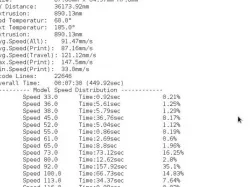
Example output for model details with speed distribution:
** Model Details **
Filename: ../MadeAlready/chichen-itza_pyramid.gcode
Layers visited: 73
Layers printed: 71
Avg.Layerheight: 0.4mm
Size: 76.42mm x 80.57mm H28.8mm
XY Distance: 103305.76mm
Extrusion: 2823.27mm
Bed Temperatur: 60.0ð
Ext Temperatur: 185.0ð
Extrusion: 2823.27mm
Avg.Speed(All): 81.22mm/s
Avg.Speed(Print): 80.34mm/s
Avg.Speed(Travel): 91.83mm/s
Max.Speed(Print): 110.0mm/s
Min.Speed(Print): 9.0mm/s
Gcode Lines: 15830
Overall Time: 00:23:53 (1433.39sec)
---------- Model Speed Distribution ------------
Speed 9.0 Time:0.11sec 0.01%
Speed 19.0 Time:11.41sec 0.8%
Speed 20.0 Time:0.02sec 0.0%
Speed 21.0 Time:32.45sec 2.26%
Speed 26.0 Time:0.94sec 0.07%
Speed 27.0 Time:149.92sec 10.46%
Speed 29.0 Time:1.92sec 0.13%
Speed 30.0 Time:0.13sec 0.01%
Speed 50.0 Time:14.01sec 0.98%
Speed 60.0 Time:49.58sec 3.46%
Speed 63.0 Time:142.19sec 9.92%
Speed 70.0 Time:242.72sec 16.93%
Speed 74.0 Time:0.3sec 0.02%
Speed 76.0 Time:0.38sec 0.03%
Speed 79.0 Time:2.01sec 0.14%
Speed 80.0 Time:80.88sec 5.64%
Speed 90.0 Time:596.4sec 41.61%
Speed 97.0 Time:7.18sec 0.5%
Speed 100.0 Time:7.57sec 0.53%
Speed 105.0 Time:0.01sec 0.0%
Speed 110.0 Time:47.13sec 3.29%
Speed 130.0 Time:12.79sec 0.89%
Gcode Analyse Time: 00:00:01
Example Output for Layer :
---------- Printed Layer ------------
2 Height: 0.2mm/0.2mm Temp:195.0ð/58.0ð Avg.Speed(Print): 45.78mm/s Time: 56.32sec 12.52%
#3 Height: 0.6mm/0.4mm Temp:185.0ð/60.0ð Avg.Speed(Print): 98.01mm/s Time: 36.85sec 8.19%
#4 Height: 1.0mm/0.4mm Temp:185.0ð/60.0ð Avg.Speed(Print): 87.07mm/s Time: 17.91sec 3.98%
#5 Height: 1.4mm/0.4mm Temp:185.0ð/60.0ð Avg.Speed(Print): 87.42mm/s Time: 17.83sec 3.96%
#6 Height: 1.8mm/0.4mm Temp:185.0ð/60.0ð Avg.Speed(Print): 86.51mm/s Time: 17.73sec 3.94%
#7 Height: 2.2mm/0.4mm Temp:185.0ð/60.0ð Avg.Speed(Print): 86.57mm/s Time: 17.76sec 3.95%
#8 Height: 2.6mm/0.4mm Temp:185.0ð/60.0ð Avg.Speed(Print): 87.54mm/s Time: 17.77sec 3.95%
#9 Height: 3.0mm/0.4mm Temp:185.0ð/60.0ð Avg.Speed(Print): 87.1mm/s Time: 17.59sec 3.91%
#10 Height: 3.4mm/0.4mm Temp:185.0ð/60.0ð Avg.Speed(Print): 86.6mm/s Time: 17.6sec 3.91%
#11 Height: 3.8mm/0.4mm Temp:185.0ð/60.0ð Avg.Speed(Print): 87.45mm/s Time: 17.57sec 3.9%
#12 Height: 4.2mm/0.4mm Temp:185.0ð/60.0ð Avg.Speed(Print): 86.54mm/s Time: 17.58sec 3.91%
#13 Height: 4.6mm/0.4mm Temp:185.0ð/60.0ð Avg.Speed(Print): 87.48mm/s Time: 17.8sec 3.96%
#14 Height: 5.0mm/0.4mm Temp:185.0ð/60.0ð Avg.Speed(Print): 86.64mm/s Time: 17.53sec 3.9%
#15 Height: 5.4mm/0.4mm Temp:185.0ð/60.0ð Avg.Speed(Print): 86.66mm/s Time: 17.64sec 3.92%
#16 Height: 5.8mm/0.4mm Temp:185.0ð/60.0ð Avg.Speed(Print): 86.58mm/s Time: 17.55sec 3.9%
#17 Height: 6.2mm/0.4mm Temp:185.0ð/60.0ð Avg.Speed(Print): 86.54mm/s Time: 17.65sec 3.92%
#18 Height: 6.6mm/0.4mm Temp:185.0ð/60.0ð Avg.Speed(Print): 86.56mm/s Time: 17.68sec 3.93%
#19 Height: 7.0mm/0.4mm Temp:185.0ð/60.0ð Avg.Speed(Print): 86.56mm/s Time: 17.61sec 3.91%
#20 Height: 7.4mm/0.4mm Temp:185.0ð/60.0ð Avg.Speed(Print): 97.55mm/s Time: 36.65sec 8.14%
#21 Height: 7.8mm/0.4mm Temp:185.0ð/60.0ð Avg.Speed(Print): 98.55mm/s Time: 36.68sec 8.15%
Example output for Layer details
** Layer Details **
2 Height: 0.2mm
LayerHeight: 0.2mm
Is Printed: true
Print Time: 00:00:56
Distance: 2712.23/534.93mm
Extrusion: 85.13mm
Bed Temperatur:58.0ð
Extruder Temperatur:195.0ð
Cooling Time (Fan): 0.06%
GCodes: 1395
GCode Linenr: 33
Dimension: 87.68mm x 64.97mm x0.2mm
Avg.Speed(All): 64.5mm/s
Avg.Speed(Print): 45.78mm/s
Avg.Speed(Travel): 140.73mm/s
Max.Speed(Print): 120.0mm/s
Min.Speed(Print): 33.0mm/s
Percent of time:12.52%
Tested mostly with slic3r generated gcodes.
Direct link to the original creator's page
More from mdietz


Similar Models
 prusaprinters
 thingiverse
 thingiverse
 thingiverse
 thingiverse
 thingiverse
 thingiverse
 thingiverse
Model Specifications
Frequently Asked Questions
How do I download GCodeInfo?
Click the "View on thingiverse" button above to visit the original model page on thingiverse. You can download the STL file directly from the creator's page for free.
What 3D printer can I use for this model?
This STL file is compatible with most FDM 3D printers (Creality Ender 3, Prusa MK3S+, Bambu Lab, etc.) and resin printers (Elegoo, Anycubic). Check the original page for recommended print settings and materials.
Is this 3D model free to download?
Yes, this model is available as a free download on thingiverse. Some creators accept tips or donations.
Can I modify this STL file?
Most STL files can be modified using free software like Blender, TinkerCAD, or Meshmixer. Check the license on the original thingiverse page to see if modifications are permitted by the creator.