 thingiverse
Food Webs
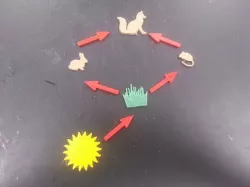
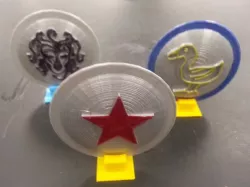
This is a work in progress project. I created these pieces as a test run, the project will be completed by the 5th grade teacher in a few weeks. The student's models will be added then.
The students will research a food web then create the pieces to make the food web. The sun and arrow pieces will be mass produced ahead of time so the students will be making the producer and consumer pieces. The students will share their food webs with their classmates.
Three methods to make the pieces
Find images on the Internet that can be converted in SVG files and imported into Tinkercad. Images should be black and white. Searches with terms like "silhouette" and "black and white clip art" can usually find an appropriate image. Online Image Converter can be used to change the image into an SVG file.
Draw the image using Google Draw. With this method only the outline of the shape needs to be draw. You can then download the drawing as an SVG and import into Tinkercad.
Draw the image on paper with a black marker. The image can then photgraphed with the camera on the student's chromebooks and converted to an SVG file and imported into Tinkercad.
Standards
NGSS
Overview and Background
The students will research a food web then create the pieces to make the food web. The sun and arrow pieces will be mass produced ahead of time so the students will be making the producer and consumer pieces. The students will share their food webs with their classmates.
Lesson Plan and Activity
Three methods to make the pieces
Find images on the Internet that can be converted in SVG files and imported into Tinkercad. Images should be black and white. Searches with terms like "silhouette" and "black and white clip art" can usually find an appropriate image. Online Image Converter can be used to change the image into an SVG file.
Draw the image using Google Draw. With this method only the outline of the shape needs to be draw. You can then download the drawing as an SVG and import into Tinkercad.
Draw the image on paper with a black marker. The image can then photgraphed with the camera on the student's chromebooks and converted to an SVG file and imported into Tinkercad.
Direct link to the original creator's page
More from mfritz
Similar Models
Model Specifications
Frequently Asked Questions
How do I download Food Webs?
Click the "View on thingiverse" button above to visit the original model page on thingiverse. You can download the STL file directly from the creator's page for free.
What 3D printer can I use for this model?
This STL file is compatible with most FDM 3D printers (Creality Ender 3, Prusa MK3S+, Bambu Lab, etc.) and resin printers (Elegoo, Anycubic). Check the original page for recommended print settings and materials.
Is this 3D model free to download?
Yes, this model is available as a free download on thingiverse. Some creators accept tips or donations.
Can I modify this STL file?
Most STL files can be modified using free software like Blender, TinkerCAD, or Meshmixer. Check the license on the original thingiverse page to see if modifications are permitted by the creator.