 cults3d
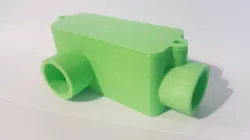
Electrical Junction Box
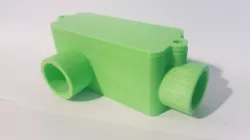
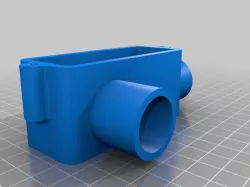
Electrical Junction Box developed from scratch using Fusion 360.
This was a Fusion 360 Tutorial by Lars Christensen, which I found very helpful in learning the basics for the next step after TinkerCAD.
I was so impressed I had to print the object on my ANet A8 Printer, which I also built myself so this felt like a complete build from start to finish.
The tutorial series for this specific build can be found here...
Fusion 360 Tutorial for Absolute Beginners— Part 1
https://www.youtube.com/watch?v=A5bc9c3S12g
Fusion 360 Tutorial for Absolute Beginners— Part 2
https://www.youtube.com/watch?v=HXRMzJWo0-Q&t=5s
Fusion 360 Tutorial for Absolute Beginners— Part 3
https://www.youtube.com/watch?v=zS8dYA_Iluc&t=41s
Transferred from my Thingiverse (3585993).
Direct link to the original creator's page
Also Available On
More from mystrey2010

Similar Models


Model Specifications
Frequently Asked Questions
How do I download Electrical Junction Box?
Click the "View on cults3d" button above to visit the original model page on cults3d. You can download the STL file directly from the creator's page.
What 3D printer can I use for this model?
This STL file is compatible with most FDM 3D printers (Creality Ender 3, Prusa MK3S+, Bambu Lab, etc.) and resin printers (Elegoo, Anycubic). Check the original page for recommended print settings and materials.
Is this 3D model free to download?
This is a premium model priced at on cults3d. Premium models often include higher detail, multiple parts, and print-tested files.
Can I modify this STL file?
Most STL files can be modified using free software like Blender, TinkerCAD, or Meshmixer. Check the license on the original cults3d page to see if modifications are permitted by the creator.