 prusaprinters
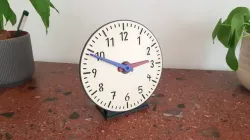
Educational clock
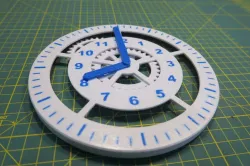
This is an educational clock to teach the analogue clock. Also interesting for lovers of clockworks or gearboxes ;)Completely printed without supports, no need for glue or screws either!Also fits onto the Prusa mini (: The hour- and minute hands are connected with a two-staged planetary geared clockwork on the back of the clock. Therefore they move in the correct ratio of 1:12. For a full turn of the minute hand, the hour hand will move one hour.This can be done by directly moving the minute hand with a finger, or for a better view onto the clock face, by turning the grip on the backside of the clock.Print specifications of the example in the pictures:PLA, 0.2mm layer height2 perimeters, 20% infillabout 20 hours total print time (normal print mode, with same colour separation as in the pictures, could be faster or slower with more or less filament colours)Assembly:Print all partsAmount of needed parts is in the notes of the files. Step 1: slide the connection pins through the holes of the clock_body and attach the clock_face.make sure the “12” points towards the upward pin. Then slide the hour and minute hand through the middle hole and make sure both hands point towards “12”.Step 2:Place the partly assembled clock with the clock face onto the desk. Make sure that both hands still point towards “12”. Then attach the A_planet_carrier onto the hour_hand.There is a little triangle engraved into the A_planet_carrier. All triangles of all parts must be installed pointing upwards toward “12”Step 3:Install the A_gear_ring and the A_sun_gear, both with the triangle pointing upwards. After that install A_planet_gears.Step 4:Install the B_gear_gring and B_planet_carrier with the triangle pointing upwards.Step 5Place the B_sun_gear with the triangle pointing upwards. Then place the B_planet_gears.Step 6Slide the stand_back over the connection_pins and fix it with the small clips.Step 7Install the grip and fix it with the big clip. Then attatch the stand_bottomFinished- have fun!
Direct link to the original creator's page
Also Available On
More from jakob
Similar Models
 thingiverse
 thingiverse
 myminifactory
 thingiverse
 prusaprinters
 thingiverse
 thingiverse
 thingiverse
Model Specifications
Frequently Asked Questions
How do I download Educational clock?
Click the "View on prusaprinters" button above to visit the original model page on prusaprinters. You can download the STL file directly from the creator's page for free.
What 3D printer can I use for this model?
This STL file is compatible with most FDM 3D printers (Creality Ender 3, Prusa MK3S+, Bambu Lab, etc.) and resin printers (Elegoo, Anycubic). Check the original page for recommended print settings and materials.
Is this 3D model free to download?
Yes, this model is available as a free download on prusaprinters. Some creators accept tips or donations.
Can I modify this STL file?
Most STL files can be modified using free software like Blender, TinkerCAD, or Meshmixer. Check the license on the original prusaprinters page to see if modifications are permitted by the creator.