 thingiverse
Dado Jig
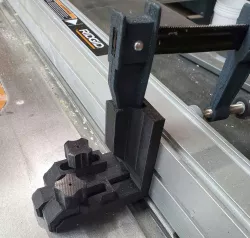
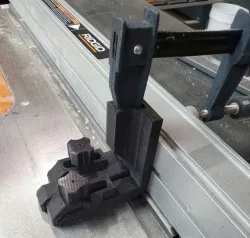
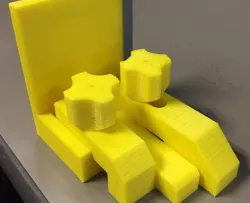
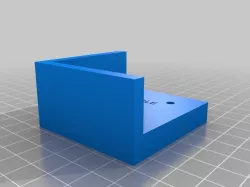
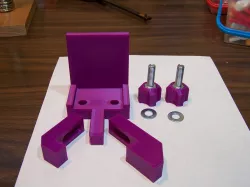
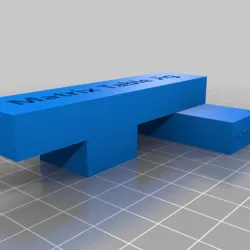
I needed a good dado jig for a project I was working on but did not want to pay the $45 most cost so I designed my own. The slot on top fits a cheap harbor freight clap and I made space for two big magnets on the bottom.
It uses 2 5/16th nuts glued in place and 2 5/16 bolts, the bolts fit very tight in the knobs so a little tapping with a hammer works good enough.
The legs have little guides on them so you cant put them on the wrong side and they slide straight.
I designed it to be roughly 4 inches long and depending on your printer resolution you could use it to set your table saw ruler.
How to use the Jig
Step 1: Secure some wood to your slide and make a cut
Step 2: Move the Jig in until the middle leg is just touching the teeth of the blade.
Step 3: Without moving the whole jig move leg 1 (it should be the one on the right if you are looking at it head-on) and move it up to touch the end of the cut you made then tighten it down. Leg 1 now is set to the thickness of your blade.
Step 4: You can move the jig away from the blade, using an angle ruler or something like up against leg 1 so it makes a straight line. In from of leg 2 (the one on the left if you are looking at it) put a piece of the material you are cutting the dado for. Move leg 2 up to this material making sure everything is square. Lock it down and then move leg 1 back to its starting position you don't need it anymore.
Set your fence and cut depth to whatever you need and make your first cut referenced off the middle leg and the second off leg 2 and those will be the two outside cuts of your dado.
It's really easy.
Direct link to the original creator's page
Also Available On
More from jardan

Similar Models
Model Specifications
Frequently Asked Questions
How do I download Dado Jig?
Click the "View on thingiverse" button above to visit the original model page on thingiverse. You can download the STL file directly from the creator's page for free.
What 3D printer can I use for this model?
This STL file is compatible with most FDM 3D printers (Creality Ender 3, Prusa MK3S+, Bambu Lab, etc.) and resin printers (Elegoo, Anycubic). Check the original page for recommended print settings and materials.
Is this 3D model free to download?
Yes, this model is available as a free download on thingiverse. Some creators accept tips or donations.
Can I modify this STL file?
Most STL files can be modified using free software like Blender, TinkerCAD, or Meshmixer. Check the license on the original thingiverse page to see if modifications are permitted by the creator.