 thingiverse
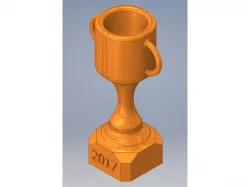
Customizable Trophy
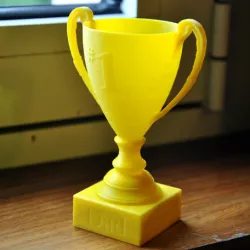
An acquaintance saved my son's life by administering the heimlich maneuver. I have been trying to say thank you in as many ways as I can. This is one of those ways.
Version #2 (which is what you can download here) came out GREAT! One print and it was all ready to go. I did use some fine grit sandpaper to smooth out the handles. Unfortunately, I was so excited about it that I gave the trophy to my son's HERO LIFESAVING GUY before I thought to take a picture of it.
I can't post the .ipt file for you to edit in Autodesk Inventor, so I'm wondering how anyone else will be able to edit the embossed text. Ideas? I'm kind of new at this.
Print Settings
Printer Brand:
Ultimaker
Printer:
Ultimaker 2
Rafts:
No
Supports:
Yes
Resolution:
Fine
Infill:
20%
Notes:
You definitely have to rotate this trophy to stand on its' base before you print it. To add stability, I would add a brim or raft.
Post-Printing
Finishing
I sanded some of the surfaces on this thing to smooth out some rough edges. I used fine grit sandpaper.
How I Designed This
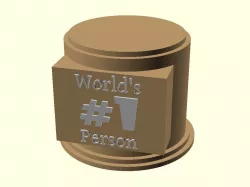
I created this in Autodesk Inventor as an .ipt file, where you can customize the embossed text on the base of the trophy.
Direct link to the original creator's page
Also Available On
More from photoflow

Similar Models
Model Specifications
Frequently Asked Questions
How do I download Customizable Trophy?
Click the "View on thingiverse" button above to visit the original model page on thingiverse. You can download the STL file directly from the creator's page for free.
What 3D printer can I use for this model?
This STL file is compatible with most FDM 3D printers (Creality Ender 3, Prusa MK3S+, Bambu Lab, etc.) and resin printers (Elegoo, Anycubic). Check the original page for recommended print settings and materials.
Is this 3D model free to download?
Yes, this model is available as a free download on thingiverse. Some creators accept tips or donations.
Can I modify this STL file?
Most STL files can be modified using free software like Blender, TinkerCAD, or Meshmixer. Check the license on the original thingiverse page to see if modifications are permitted by the creator.