 thingiverse
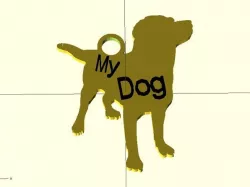
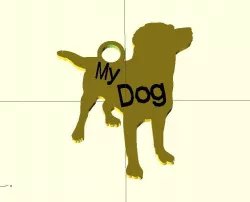
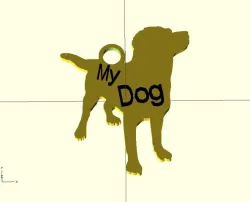
Customizable KeyChain
Choose an Image, place the ring, done !
You can also add text (optional)
You can pick from more than 30 images !!!!
More images coming soon, send me a SVG-file and it will be added !!
Features:
Choose an image out of more than 30 images.
See: http://www.thingiverse.com/thing:47759
Place ring
Add Text (Optional)
Add background rectangle or oval
Scale image
Update 27-3-2012:
Added images:
Heart
Shark
Instructions
1) Choose an image (out of more than 30 images!), place the ring, add text (optional)
Note:
Some images have holes/loose parts, you should add a rectangle or oval behind those images.
Then also make sure that there are no parts of the image outside of the rectangle/oval because that might cause print-problems!!
2) Print
you can scale with slicer if you want a bigger or smaller keychain
3) ???
4) Done !
Direct link to the original creator's page
Also Available On
More from frankkienl
Similar Models
 cults3d
 prusaprinters
 thingiverse
 thingiverse
 thingiverse
 thingiverse
 cults3d
 thingiverse
Model Specifications
Frequently Asked Questions
How do I download Customizable KeyChain?
Click the "View on thingiverse" button above to visit the original model page on thingiverse. You can download the STL file directly from the creator's page for free.
What 3D printer can I use for this model?
This STL file is compatible with most FDM 3D printers (Creality Ender 3, Prusa MK3S+, Bambu Lab, etc.) and resin printers (Elegoo, Anycubic). Check the original page for recommended print settings and materials.
Is this 3D model free to download?
Yes, this model is available as a free download on thingiverse. Some creators accept tips or donations.
Can I modify this STL file?
Most STL files can be modified using free software like Blender, TinkerCAD, or Meshmixer. Check the license on the original thingiverse page to see if modifications are permitted by the creator.