 prusaprinters
Customizable Hook
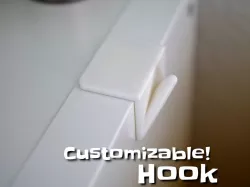
This is a configurable coat hook. You can stick the 48mm version onto the side of an Ikea Kallax using Tesa Powerstrips and create a coat hanger for your kids.
Note: I originally uploaded this to Thingiverse, so there are some references below to that site.
If you could take a picture of an actual print, please "comment" and attach the picture. - I am curious to see your uses in the wild!
You can configure (Either by using OpenSCAD and the customizing instructions here or by the Thingiverse Customizer):
The number of hooks and their distance
The width of the hook, the hooks angle and tip radius
The width of the corner the hook is attached to, the thickness of the corner
The printing orientation
a single hook works "on the side" without support material / raft if you have good adhesion.
"45 degrees" might need some support material and a raft, but is probably the only choice if you have more than 2 hooks
Check out my other customizable creations!
Have fun!
Print instructionsYou can print it without support.
Direct link to the original creator's page
Also Available On
More from makkuro
Similar Models
 prusaprinters
 thingiverse
 prusaprinters
 prusaprinters
![Customizable clothes hook [mounted-from-the-back-edition]](https://bamax.es/php/files/uploads/476/customizable-clothes-hook-mounted-from-the-back-edition-fvB6hST1_200.webp) prusaprinters
prusaprinters
 prusaprinters
 prusaprinters
 prusaprinters
Model Specifications
Frequently Asked Questions
How do I download Customizable Hook?
Click the "View on prusaprinters" button above to visit the original model page on prusaprinters. You can download the STL file directly from the creator's page for free.
What 3D printer can I use for this model?
This STL file is compatible with most FDM 3D printers (Creality Ender 3, Prusa MK3S+, Bambu Lab, etc.) and resin printers (Elegoo, Anycubic). Check the original page for recommended print settings and materials.
Is this 3D model free to download?
Yes, this model is available as a free download on prusaprinters. Some creators accept tips or donations.
Can I modify this STL file?
Most STL files can be modified using free software like Blender, TinkerCAD, or Meshmixer. Check the license on the original prusaprinters page to see if modifications are permitted by the creator.