 thingiverse
Custom start Gcode
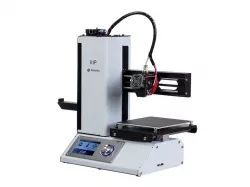
Custom priming/ start gcode for mpsm printers, prevents dirtying of nozzles when the old code sends the nozzle into the prime tower. Here is the code:
G21;(metric values)
G90;(absolute positioning)
M82;(set extruder to absolute mode)
M107;(start with the fan off)
G28;(Home the printer)
G92 E0;(Reset the extruder to 0)
G0 Z3 X128;(move extruder far right)
G0 E20;(prime nozzle)
G4 P1000; (wait 1 sec)
G0 X60 Z0;(move left and zero bed)
G92 E0;(Reset the extruder to 0)
G0 X-1 Z0;(Move outside the printable area)
G92 E0;(Reset the extruder to 0)
G1 Y60 E8 F500;(Draw a priming/wiping line to the rear)
G1 X-1;(Move a little closer to the print area)
G1 Y10 E16 F500;(draw more priming/wiping)
G1 E15 F250;(Small retract)
G92 E0;(Zero the extruder)
Copy/ paste instead of old gcode, enjoy and toggle as needed.
here is another one that waits 2 seconds instead of 1 to home itself after the priming blob(sometimes makes it work better)
G21;(metric values)
G90;(absolute positioning)
M82;(set extruder to absolute mode)
M107;(start with the fan off)
G28;(Home the printer)
G92 E0;(Reset the extruder to 0)
G0 Z3 X128;(move extruder far right)
G0 E20;(prime nozzle)
G4 P2000;(wait 2 sec)
G0 X60 Z0;(move left and zero bed)
G0 X-1 Z0;(Move outside the printable area)
G92 E0;(Reset the extruder to 0)
G1 Y60 E8 F500;(Draw a priming/wiping line to the rear)
G1 X-1;(Move a little closer to the print area)
G1 Y10 E16 F500;(draw more priming/wiping)
G1 E15 F250;(Small retract)
G92 E0;(Zero the extruder)
Enjoy cleaner nozzles! Video demonstrating the code in action here:https://www.youtube.com/watch?v=m78eN-DsSxY
Modified gcode that homes and does a prime strip without the blob that dirties nozzles.
G21;(metric values)
G90;(absolute positioning)
M82;(set extruder to absolute mode)
M107;(start with the fan off)
G28;(Home the printer)
G92 E0;(Reset the extruder to 0)
G0 X-1 Z0;(Move outside the printable area)
G92 E0;(Reset the extruder to 0)
G1 Y60 E8 F500;(Draw a priming/wiping line to the rear)
G1 X-1;(Move a little closer to the print area)
G1 Y10 E16 F500;(draw more priming/wiping)
G1 E15 F250;(Small retract)
G92 E0;(Zero the extruder)
And here is one that does the strip only one way( never goes back through the strip)
G21;(metric values)
G90;(absolute positioning)
M82;(set extruder to absolute mode)
M107;(start with the fan off)
G28;(Home the printer)
G92 E0;(Reset the extruder to 0)
G0 X-1 Z0;(Move outside the printable area)
G1 Y60 E8 F500;(Draw a priming/wiping line to the rear)
G0 Z3
G0 Y0
G0 Z0
G1 X-1;(Move a little closer to the print area)
G1 E15 F250;(Small retract)
Direct link to the original creator's page
More from monopriceman
Similar Models
 thingiverse
 cults3d
 cults3d
 thingiverse
 prusaprinters
 cults3d
 thingiverse
 thingiverse
Model Specifications
Frequently Asked Questions
How do I download Custom start Gcode?
Click the "View on thingiverse" button above to visit the original model page on thingiverse. You can download the STL file directly from the creator's page for free.
What 3D printer can I use for this model?
This STL file is compatible with most FDM 3D printers (Creality Ender 3, Prusa MK3S+, Bambu Lab, etc.) and resin printers (Elegoo, Anycubic). Check the original page for recommended print settings and materials.
Is this 3D model free to download?
Yes, this model is available as a free download on thingiverse. Some creators accept tips or donations.
Can I modify this STL file?
Most STL files can be modified using free software like Blender, TinkerCAD, or Meshmixer. Check the license on the original thingiverse page to see if modifications are permitted by the creator.