 cults3d
Crystal Generator
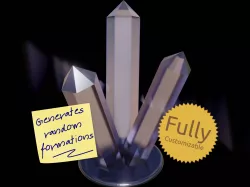
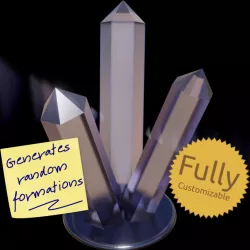
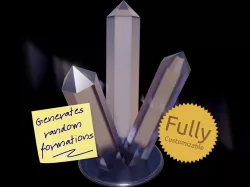
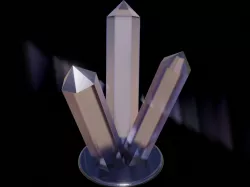
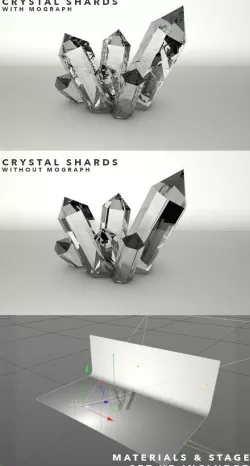
Generate unique, ornamental crystal formations with our latest, free, 3D printable design.
This customizable design allows you to choose the number of shards, the number of sides each shard has, their length, diameter, tilt and offset. Then you can specify how much randomness to apply to generate unique crystal structures.
This design is completely free and shared under a permissive license. Your support is hugely appreciated.
Did you know?
Some of our designs cannot be found on Thingiverse. If you are looking for more, check out our premium projects:
https://codeandmake.com/premium
OpenSCAD Customizer Options
We recommend you use OpenSCAD to customize this design.
As of version 1.2, a 'deterministic' Randomness option is available. We thank robkingva (https://www.thingiverse.com/robkingva/) for this suggestion.
In 'Non-deterministic' mode (the default mode and how previous versions worked), OpenSCAD will generate completely new formations as you adjust each Customizer option. To preview a new formation, simply press F5. When you are happy, press F6 to render a random crystal with your chosen Customizer settings. You may need to press F6 a few times but, as this design uses a low polygon count, each new render should be quick.
In 'Deterministic' mode, all randomness is derived from the Seed value. This means that for any given set of Customizer settings, the same design will be generated. In other words; in 'Deterministic' mode the randomness is predictable. The suggested way to use this mode is to adjust the Seed value until you find a design you like and then use the other Customizer options to fine tune the design. Once you have chosen your design, you can create a Customizer preset in OpenSCAD so that you can recall and re-generate the same design in the future.
This design has the following Customizer options:
Randomness
Randomness - Type of randomness
Seed - Seed value
Shards
Number_of_Shards - Number of crystal shards
Shard_Sides - Number of sides each crystal shard has
Shard_Length - Length of each crystal shard
Shard_Diameter - Diameter of each crystal shard
Shard_Tilt - Amount of tilt applied to each crystal shard
Shard_Offset - Amount to offset each crystal shard from the center
Variation
Shard_Length_Variance_Percentage - Amount of random variance to apply to the length
Shard_Diameter_Variance_Percentage - Amount of random variance to apply to the diameter
Shard_Tilt_Variance_Percentage - Amount of random variance to apply to the tilt
Shard_Offset_Variance_Percentage - Amount of random variance to apply to the offset
Shard_Spacing_Variance_Percentage - Amount of random variance to apply to the spacing
Hollow
Hollow_Shards - Should the shards be hollow?
Hollow_Base - Should the base also be hollow? Only valid if 'Hollow_Shards' is set to 'Yes'
Hollow_Shard_Wall_Thickness - Wall thickness of hollow shards
Base
Base_Type - Type of base
Base_Thickness - Thickness of the base
Design Considerations
Consider printing this in a translucent or glow-in-the dark filament or resin and possibly adding some under-lighting, using something like a NeoPixel Ring.
As of v1.1, you can generate hollow formations, allowing for improved lighting effects. For example, you could insert LEDs into some of the shards or use our illuminating base to create a desk lamp. See: https://www.thingiverse.com/thing:4850163 (https://www.thingiverse.com/thing:4850163)
(https://www.thingiverse.com/thing:4850163)
Material
This design is perfect for printing in most filaments, but we recommend translucent filaments/resins in particular for this design.
Versions
1.2 (14 Jun 2021)
Added support for deterministic randomness (Randomness and Seed) - Suggested by robkingva (https://www.thingiverse.com/robkingva/)
1.1 (1 May 2021)
Added support for hollow formations (Hollow_Shards, Hollow_Base and Hollow_Shard_Wall_Thickness)
Renamed Customizer options (Crystal_* > Shard_*)
Fixed spacing variance bug
1.0 (28 Apr 2021) - Initial version
Printing
Recommended slicer settings:
Resolution: 0.1mm - 0.2mm
Infill: ~10 - 20% recommended.
For solid formations:
Supports: Should not be required.
Rafts: Not required, unless you experience adhesion issues.
For hollow formations:
Supports: Should not be required for the outsides of the shards, but some hollow formations may require internal supports. We recommending using buildplate supports. In Cura set 'Support Placement' to 'Touching Buildplate'.
Rafts: We recommend printing with an internal brim for the support material. In Cura disable the 'Brim Only on Outside' setting.
License
The "Crystal Generator" models (.stl) are licensed under the CC BY license by Code and Make.
The "Crystal Generator" code (.scad) is licensed under The MIT License by Code and Make.
We are proud to offer content to you absolutely free.
We love to create free content for you. As you might imagine, it takes a lot of time. Supporters help us fund materials and equipment to create future projects and tutorials. To show your appreciation, please use the link below:
https://codeandmake.com/support
We thank you so much for your support!
Direct link to the original creator's page
Also Available On
More from make
 cgtrader
 prusaprinters
 prusaprinters
 prusaprinters
 prusaprinters
 prusaprinters
Similar Models

Model Specifications
Frequently Asked Questions
How do I download Crystal Generator?
Click the "View on cults3d" button above to visit the original model page on cults3d. You can download the STL file directly from the creator's page.
What 3D printer can I use for this model?
This STL file is compatible with most FDM 3D printers (Creality Ender 3, Prusa MK3S+, Bambu Lab, etc.) and resin printers (Elegoo, Anycubic). Check the original page for recommended print settings and materials.
Is this 3D model free to download?
This is a premium model priced at on cults3d. Premium models often include higher detail, multiple parts, and print-tested files.
Can I modify this STL file?
Most STL files can be modified using free software like Blender, TinkerCAD, or Meshmixer. Check the license on the original cults3d page to see if modifications are permitted by the creator.