 thingiverse
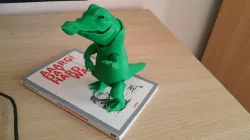
croco
Description of the 3D model (i improve and simplify joint system in croco 2.0)
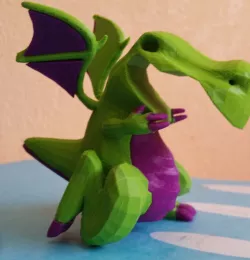
This model is the evolution of low poly crocodile posted previously.
It presents 3 (see 4) kinds of solutions for the rotation and the movement of the parts of the model.
So he became a "Croco Action".
The impression:
the files are printable at scale or at 125%. Below 100% some parts are too small. The file (PieceJoint) must be printed at 100% filling and with support on the pieces (not only on the board). For the other file (body) I recommend a light support (angle to 70%), even if their absence is not problematic. For the thickness of the outline (of the wall or the shell ....) I recommend 2mm.
Mounting
So there are 2 STL files: -> [crocoCorps] gathers the different members of the model (the torso, the arms, etc) (cf photo membres.jpg) -> [crocoPieceJoint] is made up of the elements which allow the rotation and the assembly of members (see photo pieceJoint.jpg)
-The arms and legs are assembled to the body by the small hinge model (see photo charn_Petite.jpg). In addition these members are held in place by a small piece that is placed (with a clamp) at the beveled end of the hinge. This end goes into the torso, the other end goes into the arms and legs.
-> How to:
-Assemble the jaw with the head (see photo tete.jpg). It is useless to push the axle too far into the holes. We cut the part of the axis that exceeds.
-Assemble the hand and arms (see photo Bras.jpg). We cut the part of the axis that exceeds.
-Assemble the big hinges and the small ones (the cylinders serve as axis), then introduce them in the arms and the legs, then place the legs and the arms in the torso and finally one places the small parts to hold these members (this operation is delicate because it is necessary to clean beforehand the parts of the residues of the printing).
-finally we introduce the big hinges in the head and in the tail, then in the torso (see photo Char-tete.jpg).
Voilà Have Fun.
Note: when the parts becomming loose just put on and let glue dry on the hinges.
Direct link to the original creator's page
Also Available On
More from proteine0
Similar Models



Model Specifications
Frequently Asked Questions
How do I download croco?
Click the "View on thingiverse" button above to visit the original model page on thingiverse. You can download the STL file directly from the creator's page for free.
What 3D printer can I use for this model?
This STL file is compatible with most FDM 3D printers (Creality Ender 3, Prusa MK3S+, Bambu Lab, etc.) and resin printers (Elegoo, Anycubic). Check the original page for recommended print settings and materials.
Is this 3D model free to download?
Yes, this model is available as a free download on thingiverse. Some creators accept tips or donations.
Can I modify this STL file?
Most STL files can be modified using free software like Blender, TinkerCAD, or Meshmixer. Check the license on the original thingiverse page to see if modifications are permitted by the creator.