 thingiverse
Clock
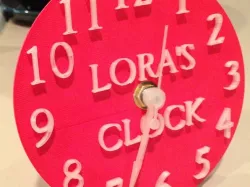
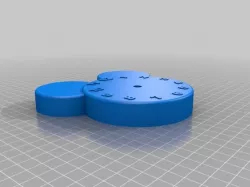
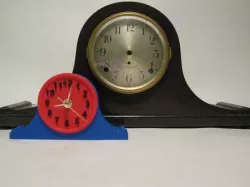
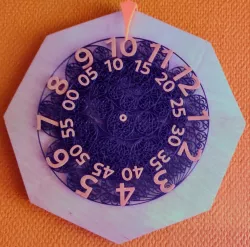
Analog clock face, hands and stand. The numerals on the clock face and hands are made with glow in the dark PLA for night time viewing.
Instructions
Overview:
Designed using Sketchup 8 (free version). The files are included in the download (.skp extension) if you want to add your own text to the clock face, edit the hands, etc. The hour numbers on the clock face were created using "Goudy Old Style" font (Mac), 20mm high, italic. "Lora's Clock" was created using "Goudy Old Style" font (mac), 16mm high, italic. Neither printed well, perhaps bold would print better. During testing I printed the numbers only using the
"Goudy Old Style" regular font 15mm high and it printed well.
Printed on a Replicator 2 using ReplicatorG with the following settings:
a) Infill: 20% for face and stand, 100% for hands,
b) Layer height: .2,
c) Shells: 1,
d) All other settings are default.
Assembly steps:
1) Purchase "The Clock Shop Item #192427" clock mechanism (found mine at Hobby Lobby).
2) Start printing the clock face. At around the 30% complete mark (on my system at least), the clock face numbers begin to be printed. Pause the build at this point, unload the red PLA, load the glow in the dark PLA (found mine at Amazon.com), then resume the build.
3) Print the hands. Note the second hand, if used, needs a #70 hole (.028) drilled in the shaft. I used a "pen" drill and bit (had one for years, but hobby shops sell them). A straight of safety pin may work to create the hole, but I did not try it.
4) Print the stand (It is provided on it's face for faster printing. Previously, it was on edge and printed better, but took twice as long to print.).
5) Place the black washer, stand, face, brass washer then hex nut on the clock mechanism, then tighten the hex nut. If the stand and face holes are too tight, use a hobby knife or 5/16" drill bit to enlarge them.
5) Carefully place the hour, minute, and, if used, second hand on the clock shaft at the 12 o'clock position.
6) Insert battery, set the time, watch it glow.
Direct link to the original creator's page
Also Available On
Similar Models
Model Specifications
Frequently Asked Questions
How do I download Clock?
Click the "View on thingiverse" button above to visit the original model page on thingiverse. You can download the STL file directly from the creator's page for free.
What 3D printer can I use for this model?
This STL file is compatible with most FDM 3D printers (Creality Ender 3, Prusa MK3S+, Bambu Lab, etc.) and resin printers (Elegoo, Anycubic). Check the original page for recommended print settings and materials.
Is this 3D model free to download?
Yes, this model is available as a free download on thingiverse. Some creators accept tips or donations.
Can I modify this STL file?
Most STL files can be modified using free software like Blender, TinkerCAD, or Meshmixer. Check the license on the original thingiverse page to see if modifications are permitted by the creator.