 thingiverse
Chip-E-Balance
https://youtu.be/xnNJ8LDQF4Y
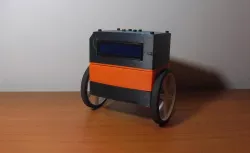
This CHIP-E can balance on two wheels, just like a segway or hoverboard.
This is the Chip-E robot with a modified bottom plate to accommodate 2 micro-metal gear motors with their brackets.
The new bottom plate was designed with Autodesk Fusion 360.
To build this robot I printed the original Chip-E parts (except for the bottom plate).
Besides the basic Chip-E kit, I used:
- A pair of Pololu's micro-metal gear motors (150:1), with their respective brackets for mounting
- A pair of 70x8mm wheels for the motors.
- One MPU6050 IMU sensor (mounted on Head)
- One TB6612FNG motor driver.
Connections from Arduino to MPU6050:
GND GND
5V VCC
PIN A4 SDA
PIN A5 SCL
PIN 2 INT
Connections from Arduino to TB6612FNG
5V VCC
5V STBY
PIN 6 AIN1
PIN 7 AIN2
PIN 10 PWMA
PIN 8 BIN1
PIN 9 BIN2
PIN 11 PWMB
Download code here: http://femb.com.mx/files/CHIP_E_BALANCE.rar
Direct link to the original creator's page
Similar Models

Model Specifications
Frequently Asked Questions
How do I download Chip-E-Balance?
Click the "View on thingiverse" button above to visit the original model page on thingiverse. You can download the STL file directly from the creator's page for free.
What 3D printer can I use for this model?
This STL file is compatible with most FDM 3D printers (Creality Ender 3, Prusa MK3S+, Bambu Lab, etc.) and resin printers (Elegoo, Anycubic). Check the original page for recommended print settings and materials.
Is this 3D model free to download?
Yes, this model is available as a free download on thingiverse. Some creators accept tips or donations.
Can I modify this STL file?
Most STL files can be modified using free software like Blender, TinkerCAD, or Meshmixer. Check the license on the original thingiverse page to see if modifications are permitted by the creator.