 CrealityCloud
Other STL indir - Long Microgreens Growing Kit – Custom Name | No Support - Vireo Studio
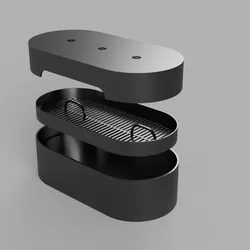
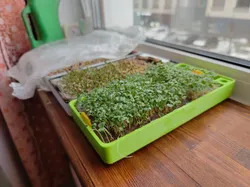
🪴 Long Microgreens Growing Kit – Custom Name Ready | No Supports NeededThis sleek, minimalist 3D printable microgreens kit is perfect for anyone looking to grow their own greens right on the kitchen counter — whether for fun, health, or profit!It’s compact, stackable, and designed to print fast with no supports.🌿 Includes 3 printable parts:• Container (flat-bottomed, includes space for a custom name or message)• Microgreens tray (roots grow through slits)• Snap-on lid for sprouting stage💧 How to grow (no soil or paper needed!):1. Soak your microgreens seeds for 6–8 hours.2. Spread the soaked seeds directly on the tray.3. Place the tray into the container and cover with the lid.4. Spray water onto the seeds 2–3 times daily to keep them moist.5. Once roots begin to grow through the tray, fill the bottom container with water – the roots will drink from it and grow fast!6. In 5–7 days, enjoy a fresh harvest of crunchy microgreens!🖨️ Print Settings:• No supports required• Recommended layer height: 0.2mm• Material: PLA or PETG• Wall count: 2–3• Infill: 15–20%• Use brim for the tray if needed for adhesion🎨 Tip: Use filament colors that match your kitchen aesthetic or print in transparent PETG for a hydroponic-style look!📦 Ideal for:• Makers who want to grow microgreens easily• Etsy shop owners selling gardening kits• Educational projects for kids• Kitchen decor meets sustainability👇 Download, print, grow — and don’t forget to tag me if you post your results!
Direct link to the original creator's page
More from Vireo Studio
 Thangs
 Thangs
 Thangs
 Thangs
 Thangs
 Thangs
Similar Models
 CrealityCloud
 CrealityCloud
 CrealityCloud
 Thangs
 Thangs
 Cults3D
 Cults3D
 CrealityCloud
Model Specifications
Frequently Asked Questions
How do I download Other STL indir - Long Microgreens Growing Kit ...?
Click the "View on CrealityCloud" button above to visit the original model page on CrealityCloud. You can download the STL file directly from the creator's page.
What 3D printer can I use for this model?
This model is compatible with most FDM 3D printers (Creality Ender 3, Prusa MK3S+, Bambu Lab, etc.) and resin printers (Elegoo, Anycubic). Check the original page for recommended print settings and materials.
Is this 3D model free to download?
This is a premium model priced at on CrealityCloud. Premium models often include higher detail, multiple parts, and print-tested files.
Can I modify this file?
Check the license (see original page) on the original CrealityCloud page. Most STL files can be modified using free software like Blender, TinkerCAD, or Meshmixer.