 thingiverse
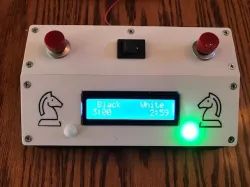
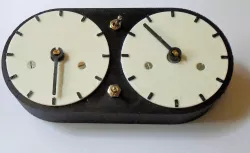
Chess clock
Chess clock is based on :
https://www.instructables.com/How-to-Make-a-Chess-Clock-With-Arduino/
By simaopintocorreia
Instructable is well written and contains all information necessary for a successful project.
Clock is powered by rechargeable batteries held by my 2 battery holder.
I added a countdown clock to beginning of program and an alarm that sounds when a player looses. Busser is connected to pin 3.
Also added section to program that allow for play time to change: 1 min, 3 min, 5 min, and 10 min games.
To make wiring easier, I made two small boards - one for power and another for ground. That allows wire to be plugged into small boards rather than main arduino board.
Switch does not work as planned - it does not completely shut off clock. Will design with proper switch. Plug power supply in to start clock.
Code follows:
#include
LiquidCrystal lcd (7, 8, 9, 10, 11, 12);
const int buttonPin = 2; // the number of the pushbutton pin
const int ledPin = 13; // the number of the LED pin
// Variables will change:
int ledState = HIGH; // the current state of the output pin
int buttonState; // the current reading from the input pin
int lastButtonState = LOW; // the previous reading from the input pin
unsigned long lastDebounceTime = 0; // the last time the output pin was toggled
unsigned long debounceDelay = 50; // the debounce time; increase if the output flickers
//double whiteTime = 610000;//10 minute game add // to not use timer, remove // to select timer
//double whiteTime = 310000;//5 minute game
double whiteTime = 190000;//3 minute game
//double whiteTime = 70000;//1 minute game
int whiteMinutes = 0;
int whiteSeconds = 0;
double whiteLastCheck = millis();
//double blackTime = 610000;//10 minute game add // to not use timer, remove // to select timer
//double blackTime = 310000;//5 minute game
double blackTime = 190000;//3 minute game
//double blackTime = 70000;//1 minute game 70000
int blackMinutes = 0;
int blackSeconds = 0;
double blackLastCheck = millis();
bool isWhiteTurn = true;
bool gameOver = false;
int countDown =0; //used for initial start countdown
int buzzer = 3;
int buzzerOff = 0;
void setup() {
Serial.begin(9600);
lcd.begin(16, 2);
lcd.setCursor(0, 0);
pinMode(buttonPin, INPUT);
pinMode(ledPin, OUTPUT);
UpdateWhiteTime();
UpdateBlackTime();
//int whiteButtonState = 0;
//int blackButtonState = 0;
}
void loop() {
int reading = digitalRead(buttonPin);
Serial.println(ledState);
if (reading != lastButtonState) {
lastDebounceTime = millis();
}
if ((millis() - lastDebounceTime) > debounceDelay) {
// whatever the reading is at, it's been there for longer
// than the debounce delay, so take it as the actual current state:
// if the button state has changed:
if (reading != buttonState) {
buttonState = reading;
// only toggle the LED if the new button state is HIGH
if (buttonState == HIGH) {
ledState = !ledState;
}
}
}// set the LED:
digitalWrite(ledPin, ledState);
if(ledState==1){
StartWhiteTurn ();
Serial.println("White");
UpdateWhiteTime();
} else if(ledState==0){
StartBlackTurn ();
Serial.println("Black");
UpdateBlackTime();
}
lastButtonState = reading;
}
void UpdateWhiteTime() {
lcd.setCursor(10,0);
lcd.print("White");
lcd.setCursor(12, 1);
Serial.println("White");
whiteTime -= ((millis() - whiteLastCheck));
whiteLastCheck = millis();
if (countDown ==0){
lcd.clear();
lcd.setCursor(2,1);
lcd.print("Count Down");
for (int i = 9;i >0; i--){
lcd.setCursor(13,1);
lcd.print(i);
delay(1000);
}
countDown = 1;
lcd.clear();
}
if (whiteTime
Direct link to the original creator's page
Also Available On
More from steveost
Similar Models
Model Specifications
Frequently Asked Questions
How do I download Chess clock?
Click the "View on thingiverse" button above to visit the original model page on thingiverse. You can download the STL file directly from the creator's page for free.
What 3D printer can I use for this model?
This STL file is compatible with most FDM 3D printers (Creality Ender 3, Prusa MK3S+, Bambu Lab, etc.) and resin printers (Elegoo, Anycubic). Check the original page for recommended print settings and materials.
Is this 3D model free to download?
Yes, this model is available as a free download on thingiverse. Some creators accept tips or donations.
Can I modify this STL file?
Most STL files can be modified using free software like Blender, TinkerCAD, or Meshmixer. Check the license on the original thingiverse page to see if modifications are permitted by the creator.