 thingiverse
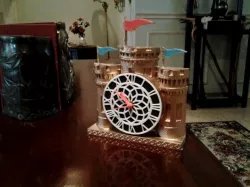
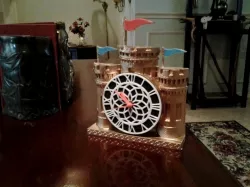
Castle Clock
80mm opening should accept any single battery clockworks.
Glue dial to disk, then attach clockworks to disk.
I painted the clock, then attached the colored flag covers, then attached clock assembly to Castle Clock body.
I printed this with 10% infill and used no support.
Print Settings
Printer:
Da Vinci Pro
Rafts:
No
Supports:
No
Resolution:
.3mm
Infill:
10 to 15%
Notes:
Post-Printing
Printed in ABS, spray painted metallic gold.
Direct link to the original creator's page
Also Available On
More from skyblu


Similar Models
Model Specifications
Frequently Asked Questions
How do I download Castle Clock?
Click the "View on thingiverse" button above to visit the original model page on thingiverse. You can download the STL file directly from the creator's page for free.
What 3D printer can I use for this model?
This STL file is compatible with most FDM 3D printers (Creality Ender 3, Prusa MK3S+, Bambu Lab, etc.) and resin printers (Elegoo, Anycubic). Check the original page for recommended print settings and materials.
Is this 3D model free to download?
Yes, this model is available as a free download on thingiverse. Some creators accept tips or donations.
Can I modify this STL file?
Most STL files can be modified using free software like Blender, TinkerCAD, or Meshmixer. Check the license on the original thingiverse page to see if modifications are permitted by the creator.