 myminifactory
Binary Watch
Binary Watch Tutorial
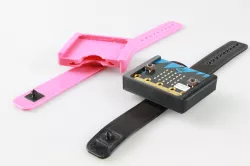
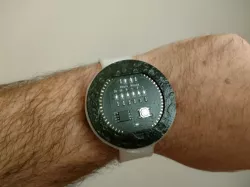
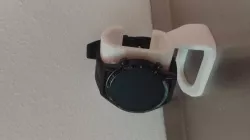
This is a fully 3D printed watch which displays the time in binary. You can rotate the dial, and also have easy access to all the pins, so let your imagination run wild as you add more functionality! J In this tutorial you will learn how to 3D print using flexible filament. You will also learn how to program a watch, converting decimal into binary. The watch will display the time in binary, this means that only people who can read binary can tell the time on this watch. Enter the Matrix and impress your friends!
Enjoy this project!
Things you will need:
• A 3D printer
• 1 micro:bit device
· Coin cell battery coin cell holder
• Filament (plastic) for your 3D printer, PLA & Flexible!
Parts description:
Step 1: Printing the Parts
1. Bracelet & Dial:
· To obtain the 3D files click the download button on this page!
· Next you will have to slice the parts: that means generate a code, representative of your 3D part which your printer will be able to understand. This action is called "slicing" because your printer prints the part layer by layer, so you need to slice your object into many digital layers. You will need to use the right slicer for your 3D printer, ask your teacher if you need help with this!
· The most important setting for the printer is the temperature of the nozzle, which will depend on the type of filament you use, the speed, the infill, the layer height, and whether you need support or not will also need to be considered.
· The bracelet and dial need to be printed with flexible filament. Use a nozzle temperature of 230°C, a high infill (more than 35%), no support and no raft. You should heat the bed to 60 degrees and put some glue on it to be sure these parts don’t warp, flexible filament doesn’t always stick very well, so be careful! Export your code to your SD card and take it over to the printer! J
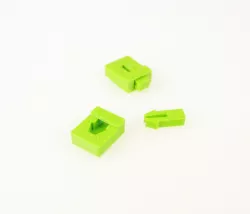
2. The dial clip and Clasp: These parts have to be printed in PLA or ABS, with a 100% infill. Because they are very small, you should print 3 of each on one print bed, with a low speed, this gives the layers time to cool as the nozzle moves between the pieces.
Step 2: Flash the micro:bitYou can found this code here
Step 3: Assemble the watch.
1) Put some glue inside the hole in the bracelet.
2) Clip the two clip parts in PLA in their respective places, and hold them together for a few minutes so the glue sticks well.
3) Clip the dialinto the bracelet.
4) Now slide the coin cell and the micro:bit inside the watch.
5) Read the time! ;)
Direct link to the original creator's page
Also Available On
More from 3dmate


Similar Models
Model Specifications
Frequently Asked Questions
How do I download Binary Watch?
Click the "View on myminifactory" button above to visit the original model page on myminifactory. You can download the STL file directly from the creator's page.
What 3D printer can I use for this model?
This STL file is compatible with most FDM 3D printers (Creality Ender 3, Prusa MK3S+, Bambu Lab, etc.) and resin printers (Elegoo, Anycubic). Check the original page for recommended print settings and materials.
Is this 3D model free to download?
This is a premium model priced at on myminifactory. Premium models often include higher detail, multiple parts, and print-tested files.
Can I modify this STL file?
Most STL files can be modified using free software like Blender, TinkerCAD, or Meshmixer. Check the license on the original myminifactory page to see if modifications are permitted by the creator.