 prusaprinters
Benchy Shelf
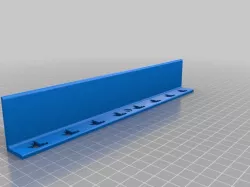
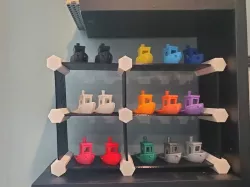
A simple little shelf to hold a collection of Benchies.
As our filament collection grows, I was inspired by http://greybeard3d.com/, not so much to create a collection of colors, but rather samples of different filaments we've gotten and used so we can look back and see which we'd re-buy, or not.
I opted to use a scaled down and modified 3DBenchy instead of the common Marvin, since Benchy shows off stringing, bridging, etc. Scaled down so it prints faster with less filament, and a modified bottom that's flat so I can write numbers on it.
We use a simple Google sheet to keep track of which Benchy# corresponds to which filament, type, where we bought it, etc.
I then needed a place to put the Benchies, and an excuse to start to learn how to design. Several iterations later, this came to be. I tried to make it as thin as practical to take less time to print. Each one takes about an hour, depending on your slicer/printer settings.
Print instructionsCategory: Organization Print Settings
Printer Brand: Prusa
Printer: i3 MK2S
Rafts: No
Supports: No
Resolution: any
Infill: any
Notes:
I printed this with .3mm layers and it works fine. You should be good with any resolution your printer can handle, there's nothing complicated about it.
The shelf is 240mm wide, so it fits nicely on my MK2s bed.
Smaller beds may need to scale it or use the included Fusion 360 file to modify it to fit. I haven't tested scaling.
It should orient with the Benchy cutouts bed down, so the mounting hole comes out round. You can probably rotate it so the shelf itself sits on the bed without issue, the silhouettes and hole are small enough most printers should handle them fine without support.
I made mine with a 2mm thick shelf which is plenty strong to hold a fleet of Benchies, but they did curve some, so I updated the design to use 3mm so you can put some more infill or perimeters to retain shape better. I also used really cheap filament.
Direct link to the original creator's page
Also Available On
More from mmontmini

Similar Models


Model Specifications
Frequently Asked Questions
How do I download Benchy Shelf?
Click the "View on prusaprinters" button above to visit the original model page on prusaprinters. You can download the STL file directly from the creator's page for free.
What 3D printer can I use for this model?
This STL file is compatible with most FDM 3D printers (Creality Ender 3, Prusa MK3S+, Bambu Lab, etc.) and resin printers (Elegoo, Anycubic). Check the original page for recommended print settings and materials.
Is this 3D model free to download?
Yes, this model is available as a free download on prusaprinters. Some creators accept tips or donations.
Can I modify this STL file?
Most STL files can be modified using free software like Blender, TinkerCAD, or Meshmixer. Check the license on the original prusaprinters page to see if modifications are permitted by the creator.